Description:
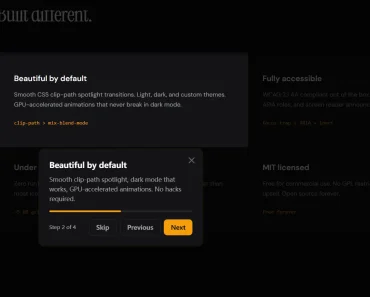
React Native Lumen is an app tour component that walks users through UI elements step by step using animated spotlight overlays.
It uses Reanimated 3 to push all animations onto the native thread for smooth, frame-rate-consistent transitions.
Features:
- All overlay and spotlight transitions run on the UI thread via Reanimated 3 worklets.
- 3 Cutout Shapes:
rounded-rect,circle, andpill. - Glow Effect with configurable color, blur radius, spread, and X/Y offset.
- Custom Tooltip Cards.
- Saves tour progress and resumes from the last completed step.
- Auto-scroll off-screen steps into view automatically.
- Full lifecycle management from any component in the tree.
Use Cases:
- New User Onboarding: Walk first-time users through core app screens by grouping steps per screen with
stepsOrderas a keyed object, then auto-resuming from the last viewed step on return visits. - Feature Announcement: Highlight a newly shipped button or screen section on app update by triggering
start('new-feature-step')directly from a version check. - Contextual Help Flows: Attach a “Show me how” button to specific sections. Call
start('section-key')to jump straight to that zone. - Gated Walkthroughs: Build step sequences that force user interaction before advancing.
How to Use It
Installation
Install the package alongside its required peer dependencies:
npm install react-native-lumen react-native-reanimated react-native-svg react-native-gesture-handler react-native-workletsOr with Yarn:
yarn add react-native-lumen react-native-reanimated react-native-svg react-native-gesture-handler react-native-workletsRequired peer versions:
| Package | Minimum Version |
|---|---|
react-native | >= 0.70.0 |
react-native-reanimated | >= 3.0.0 |
react-native-svg | >= 12.0.0 |
react-native-gesture-handler | >= 2.0.0 |
Wrap Your App with TourProvider
Place TourProvider at the root of your application. Pass the step keys in display order via stepsOrder and set global tour behavior through the config prop.
import { TourProvider, SnappySpringConfig } from 'react-native-lumen';
export default function App() {
  return (
    <TourProvider
      stepsOrder={['profile', 'feed', 'notifications']}
      config={{
        springConfig: SnappySpringConfig,
        enableGlow: true,
        backdropOpacity: 0.6,
        labels: {
          next: 'Continue',
          previous: 'Back',
          finish: 'Done',
          skip: 'Skip',
        },
      }}
    >
      <RootNavigator />
    </TourProvider>
  );
}
Register Elements with TourZone
Wrap any component you want to highlight in a TourZone. The stepKey must match a key in your stepsOrder array.
import { TourZone } from 'react-native-lumen';
// Rounded rectangle — default
<TourZone
  stepKey="profile"
  name="Your Profile"
  description="Tap here to update your name, photo, and bio."
  order={1}
  shape="rounded-rect"
  borderRadius={12}
  zonePadding={8}
>
  <ProfileCard />
</TourZone>
// Circle cutout — ideal for icon buttons or FABs
<TourZone
  stepKey="notifications"
  name="Notifications"
  description="Your alerts and mentions appear here."
  order={3}
  shape="circle"
>
  <NotificationButton />
</TourZone>
// Pill cutout — ideal for tag rows or chip lists
<TourZone
  stepKey="feed"
  name="Your Feed"
  description="Filter content by topic using these tags."
  order={2}
  shape="pill"
  zonePadding={6}
>
  <TopicTagRow />
</TourZone>
Control the Tour with useTour
Call useTour inside any descendant of TourProvider to access the full control API.
import { useTour } from 'react-native-lumen';
const OnboardingControls = () => {
  const { start, stop, next, prev, hasSavedProgress, clearProgress } = useTour();
  return (
    <>
      {hasSavedProgress ? (
        <Button title="Resume Tour" onPress={() => start()} />
      ) : (
        <Button title="Start Tour" onPress={() => start()} />
      )}
      <Button title="Reset Tour" onPress={clearProgress} />
    </>
  );
};
To jump directly to a specific step by key:
start('notifications');Glow and Border Styling
Pass glow props directly on TourZone, or group them into a zoneStyle object:
// Individual props
<TourZone
  stepKey="highlight"
  zoneGlowColor="rgba(99, 179, 237, 0.6)"
  zoneGlowRadius={12}
  zoneGlowSpread={6}
  zoneGlowOffsetY={2}
  zoneBorderColor="#63B3ED"
  zoneBorderWidth={2}
  zonePadding={10}
>
  <PrimaryAction />
</TourZone>
// zoneStyle object — equivalent configuration
<TourZone
  stepKey="highlight"
  zoneStyle={{
    glowColor: 'rgba(99, 179, 237, 0.6)',
    glowRadius: 12,
    glowSpread: 6,
    glowOffsetY: 2,
    borderColor: '#63B3ED',
    borderWidth: 2,
    padding: 10,
  }}
>
  <PrimaryAction />
</TourZone>
Custom Tooltip Card
Replace the default tooltip by passing a renderCard function to TourProvider. The function receives a CardProps object with all step data and navigation callbacks.
import { TourProvider, CardProps } from 'react-native-lumen';
import { View, Text, TouchableOpacity } from 'react-native';
const MyTooltip = ({ step, next, stop, isLast, currentStepIndex, totalSteps }: CardProps) => (
  <View style={{ backgroundColor: '#1A202C', padding: 16, borderRadius: 12 }}>
    <Text style={{ color: '#fff', fontWeight: 'bold' }}>{step.name}</Text>
    <Text style={{ color: '#CBD5E0', marginTop: 4 }}>{step.description}</Text>
    <Text style={{ color: '#718096', marginTop: 8 }}>
      {currentStepIndex + 1} of {totalSteps}
    </Text>
    <TouchableOpacity onPress={isLast ? stop : next}>
      <Text style={{ color: '#63B3ED', marginTop: 12 }}>{isLast ? 'Finish' : 'Next'}</Text>
    </TouchableOpacity>
  </View>
);
<TourProvider
  stepsOrder={['profile', 'feed']}
  config={{ renderCard: (props) => <MyTooltip {...props} /> }}
>
  <App />
</TourProvider>
Persistence and Resume
Configure persistence inside the config object to save and restore tour progress across sessions.
<TourProvider
  stepsOrder={['intro', 'dashboard', 'settings']}
  config={{
    persistence: {
      enabled: true,
      tourId: 'main-onboarding-v1',
      autoResume: true,
      clearOnComplete: true,
      maxAge: 7 * 24 * 60 * 60 * 1000, // 7 days in ms
    },
  }}
>
  <App />
</TourProvider>
To reset saved progress manually, call clearProgress() from useTour:
const { clearProgress } = useTour();
await clearProgress();
Pass a custom storage adapter to replace the default MMKV/AsyncStorage backend:
const myStorage = {
  getItem: (key) => myDB.get(key),
  setItem: (key, value) => myDB.set(key, value),
  removeItem: (key) => myDB.delete(key),
};
config={{ persistence: { enabled: true, tourId: 'tour-v1', storage: myStorage } }}
Auto-Scroll Support
Attach scrollViewRef from useTour to an Animated.ScrollView. Lumen scrolls to off-screen steps automatically when the tour advances.
import Animated from 'react-native-reanimated';
import { useTour } from 'react-native-lumen';
const ScrollableScreen = () => {
  const { scrollViewRef } = useTour();
  return (
    <Animated.ScrollView ref={scrollViewRef}>
      <TourZone stepKey="top-section" description="This is the top.">
        <TopContent />
      </TourZone>
      <TourZone stepKey="bottom-section" description="This is the bottom.">
        <BottomContent />
      </TourZone>
    </Animated.ScrollView>
  );
};
Step Enforcement
Use required to hide the Skip button. Use completed to gate the Next button until a condition becomes true.
const [userConfirmed, setUserConfirmed] = React.useState(false);
<TourZone
  stepKey="permissions"
  name="Enable Notifications"
  description="Tap Allow to continue."
  required={true}
  completed={userConfirmed}
>
  <PermissionPrompt onAllow={() => setUserConfirmed(true)} />
</TourZone>
API Reference
TourProvider Props
| Prop | Type | Default | Description |
|---|---|---|---|
children | React.ReactNode | Required | Application content. |
stepsOrder | string[] | Record<string, string[]> | undefined | Step ordering. Flat array or screen-grouped keyed object. |
backdropOpacity | number | 0.5 | Opacity of the dark backdrop overlay (0–1). |
config | TourConfig | undefined | Global configuration object. |
TourConfig Fields
| Field | Type | Default | Description |
|---|---|---|---|
springConfig | WithSpringConfig | undefined | Reanimated spring config. Use presets or a custom object. |
preventInteraction | boolean | false | Blocks app interaction while the tour is active. |
labels | object | undefined | Custom labels for Next, Previous, Finish, and Skip buttons. |
renderCard | (props: CardProps) => ReactNode | undefined | Custom tooltip renderer applied globally across all steps. |
backdropOpacity | number | 0.5 | Opacity of the overlay backdrop. |
zoneStyle | ZoneStyle | undefined | Global zone styling defaults, overridable per step. |
persistence | TourPersistenceConfig | undefined | Configuration for saving and resuming tour progress. |
enableGlow | boolean | false | Activates glow rendering for all zones. |
tooltipStyles | TooltipStyles | undefined | Style overrides for the default tooltip card. |
TourZone Props — Core
| Prop | Type | Default | Description |
|---|---|---|---|
stepKey | string | Required | Unique identifier for this step. |
name | string | undefined | Title displayed in the tooltip. |
description | string | Required | Body text displayed in the tooltip. |
order | number | undefined | Step position when stepsOrder is not set on TourProvider. |
style | ViewStyle | undefined | Style for the wrapping container. |
TourZone Props — Zone Shape and Appearance
| Prop | Type | Default | Description |
|---|---|---|---|
shape | 'rounded-rect' | 'circle' | 'pill' | 'rounded-rect' | Shape of the cutout in the overlay. |
borderRadius | number | 10 | Border radius, applies to rounded-rect only. |
zonePadding | number | 0 | Uniform padding around the highlighted element. |
zonePaddingTop | number | undefined | Top padding override. |
zonePaddingRight | number | undefined | Right padding override. |
zonePaddingBottom | number | undefined | Bottom padding override. |
zonePaddingLeft | number | undefined | Left padding override. |
zoneBorderWidth | number | 0 | Width of the border ring around the zone. |
zoneBorderColor | string | 'transparent' | Color of the border ring. |
zoneStyle | ZoneStyle | undefined | Object grouping all zone appearance options. Overrides individual props. |
TourZone Props — Glow (Requires enableGlow: true)
| Prop | Type | Default | Description |
|---|---|---|---|
zoneGlowColor | string | '#FFFFFF' | Glow color. Accepts rgba for opacity control. |
zoneGlowRadius | number | 10 | Blur radius of the glow. |
zoneGlowSpread | number | 5 | Spread radius of the glow. |
zoneGlowOffsetX | number | 0 | Horizontal offset of the glow. |
zoneGlowOffsetY | number | 0 | Vertical offset of the glow. |
TourZone Props — Interaction and Enforcement
| Prop | Type | Default | Description |
|---|---|---|---|
clickable | boolean | false | Keeps the highlighted element interactive during the tour. |
preventInteraction | boolean | undefined | Overrides the global preventInteraction setting for this step. |
required | boolean | false | Hides the Skip button for this step. |
completed | boolean | undefined | Disables Next/Finish until this resolves to true. |
renderCustomCard | (props: CardProps) => ReactNode | undefined | Custom tooltip for this step only. Overrides the global renderCard. |
useTour Return Values
| Value | Type | Description |
|---|---|---|
start | (stepKey?: string) => void | Starts or resumes the tour. Pass a stepKey to jump to a specific step. |
stop | () => void | Stops the tour and hides the overlay. Does not clear saved progress. |
next | () => void | Advances to the next step. Ignored when the current step has completed={false}. |
prev | () => void | Goes back to the previous step. |
currentStep | string | null | Key of the currently active step, or null when the tour is inactive. |
steps | Map<string, TourStep> | Map of all registered steps. |
orderedStepKeys | string[] | Full ordered step key list derived from stepsOrder. |
clearProgress | () => Promise<void> | Removes all saved tour progress from storage. |
hasSavedProgress | boolean | Returns true when saved progress is available to resume. |
scrollViewRef | AnimatedRef | Attach to an Animated.ScrollView to activate auto-scrolling. |
TourPersistenceConfig Fields
| Field | Type | Default | Description |
|---|---|---|---|
enabled | boolean | — | Activates persistence. |
tourId | string | — | Unique ID for this tour’s saved state. |
autoResume | boolean | true | Resumes from the last saved step when start() runs. |
clearOnComplete | boolean | true | Removes saved progress when the tour completes. |
maxAge | number | undefined | Milliseconds before saved progress expires. |
storage | StorageAdapter | undefined | Custom storage backend. Defaults to MMKV v4 or AsyncStorage. |
CardProps Fields
| Field | Type | Description |
|---|---|---|
step | TourStep | Current step data including key, name, and description. |
currentStepIndex | number | Zero-based index of the active step. |
totalSteps | number | Total number of steps in the tour. |
next | () => void | Advances to the next step. |
prev | () => void | Goes back to the previous step. |
stop | () => void | Stops the tour. |
isFirst | boolean | True when the active step is the first step. |
isLast | boolean | True when the active step is the last step. |
labels | TourLabels | Button label overrides from config.labels. |
required | boolean | When true, the skip button should be hidden. |
completed | boolean | When false, the next button should be disabled. |
StorageAdapter Interface
interface StorageAdapter {
  getItem: (key: string) => string | null | Promise<string | null>;
  setItem: (key: string, value: string) => void | Promise<void>;
  removeItem: (key: string) => void | Promise<void>;
}
Animation Presets
| Preset | Description |
|---|---|
Reanimated3DefaultSpringConfig | Matches Reanimated 3’s default spring behavior. |
WigglySpringConfig | Bouncy, playful feel for lighter UI contexts. |
GentleSpringConfig | Slow, smooth transitions for calm interfaces. |
SnappySpringConfig | Fast and responsive for tight, precise UI layouts. |
FAQs
Q: Can the tour span multiple screens in a React Navigation setup?
A: Yes. Pass stepsOrder as a Record<string, string[]> to group steps by screen key. When start() or next() targets a step on an unmounted screen, the tour enters a pending state and resumes automatically once that step’s TourZone mounts.
Q: How do I stop users from skipping a required step?
A: Set required={true} on the TourZone for that step. This removes the Skip button from the tooltip for that specific step only.
Q: The glow effect is not showing. What is missing?
A: enableGlow: true must be set in the config prop on TourProvider.
Q: How do I gate a step until the user completes an action?
A: Pass completed={false} to the relevant TourZone. The Next and Finish buttons stay disabled until you update that prop to true, typically through a state variable tied to the user’s action.