The autocomplete component allows you to provide users with suggestions while they are typing. This is particularly useful when you have a long list of items that could be filtered by a search bar or a set of criteria.
In this article, we will present 10 React and React Native autocomplete components, which are not just easy to customize but free to use.
Originally Published July 22 2022, updated Feb 03 2026
Table Of Contents:
Best Autocomplete Components For React:
1. React Autocomplete/Dropdown/Select Components – downshift
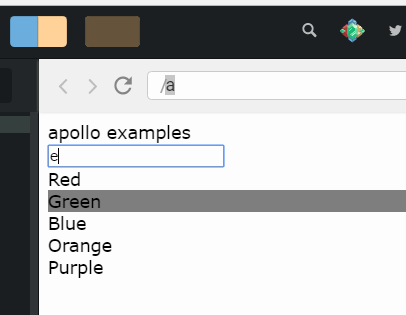
A collection of primitive components that you can compose together to create a simple, flexible, WAI-ARIA compliant React autocomplete/dropdown/select/combobox component which you can reuse in your application.
2. Github-like Textarea Autocomplete For React

This package provides React Component to achieve GitHub’s like functionality in comments regarding the textarea autocomplete.
3. react-search-autocomplete

A <ReactSearchAutocomplete> is a fully customizable search box where the user can type text and filter the results. It relies on Fuse.js for the fuzzy search.
4. Autocomplete Search Box For React

A simple lightweight autocomplete search box designed for React applications.
5. semantic-autocomplete

semantic-autocomplete is a React component that extends v6 MUI’s autocomplete and performs semantic similarity search using a small, quantized machine learning (ML) model which runs on client side.
The model is downloaded once and then taken from browser’s cache. The full functionality is provided within this React component!
6. Autocomplete Input Field For React

A React component that enables the autocomplete functionality inside your text fields.
Features:
- Supports both keyboard and mouse for option selection
- Supports responsiveness and works on every device
- Supports lazy-loading and dynamic option list updates
- Supports all major browsers including IE 8+
7. Customizable Autocomplete Search Component For React – Turnstone

A highly customizable, easy-to-use autocomplete search component for React.
Features:
- Lightweight React search box component
- Group search results from multiple APIs or other data sources with customisable headings
- Specify the maximum number of listbox options as well as weighted display ratios for each group
- Completely customise listbox options with your own React component. Add images, icons, additional sub-options, differing visual treatments by group or index and much more…
- Display typeahead autosuggest text beneath entered text
- Easily styled with various CSS methods including CSS Modules and Tailwind CSS
- Search input can be easily styled to attach to top of screen at mobile screen sizes with customisable cancel/back button to exit
- Multiple callbacks including:
onSelect,onChange,onTab,onEnterand more… - Built in WAI-ARIA accessibility
- Keyboard highlighting and selection using arrow, Tab and Enter keys
- Automated caching to reduce data fetches
- Debounce text entry to reduce data fetches
- Optional Clear button (customisable)
- Customisable placeholder text
- Add more functionality with plugins
- and much more…
Best Autocomplete Components For React Native:
1. Lightwieght Autocomplete Input Component for React Native

A lightweight autocomplete component for React Native applications. Written in TypeScript.
It provides a customizable autocomplete input that works across both iOS and Android platforms without requiring native dependencies.
Key Features
- 🚀 Pure JavaScript implementation with TypeScript support
- 📱 Cross-platform compatibility (iOS and Android)
- 🎨 Fully customizable styling for input and results list
- 🔄 Flexible data handling with array-based suggestions
- 📜 Supports both FlatList and custom renderers for results
- ⚡️ Lightweight with minimal dependencies
- 🛠️ Works with React Native’s latest versions
2. Autocomplete Dropdown For React Native

A dropdown item picker with search and autocomplete (typeahead) functionality for React Native.
3. react-native-paper-autocomplete

Great autocomplete package for React Native Paper with great web support.
- Uses re-animated to be smooth on iOS/Android/Web
- Keyboard support (Arrow down/up/end/start)
- Single + multiple
- Async connect with backend
- Grouped results
- Great web support (scrollable while open)
See Also:
- 10 Best Autocomplete & Typeahead JavaScript Plugins
- 5 Best Autocomplete Components For Vue.js Applications