React is one of the leading front-end frameworks, and it helps with many common tasks related to building user interfaces. It offers a variety of pre-built solutions with solutions for common design patterns, ranging from reusable form elements to data tables. There are also numerous third-party React components that address specific problems, and zooming images is no exception.
Imagery plays a vital role in web design, no matter if you are trying to attract more visitors’ attention or have one thing to offer through the pictures. Image zooming is an essential tool that creates an excellent user experience on the website.
In this article, we’ve set out to showcase the best React & React Native image zoom components that are easy to use, lightweight, and well supported by the provider. Some of the components used a modern API for working with images, some were easier for development and some were more exciting in terms of appearance.
There are a lot of image zoom components out there so it took quite some time to research but we’re confident that the list below is up to date and useful. Hopefully, you’ll find a great solution here or perhaps this will help you cut down your research time.
Originally Published June 20 2022, updated Jan 18 2026
1. Medium.com Style Image Zoom For React

A Medium.com-style image zoom component for React that allows for a low-res and high-res images to work together for “zooming” effects.
Supports img, picture, svg, figure, and even div elements.
2. react-zoom-pan-pinch

Super fast and light react npm package for zooming, panning and pinching html elements in easy way. Supports <img />, <div />, and more.
Features
- Fast and easy to use
- Light, without external dependencies
- Mobile gestures, touchpad gestures and desktop mouse events support
- Powerful context usage, which gives you a lot of freedom
- Highly customizable
- Animations and Utils to create own tools
- Advanced hooks and components
3. React SVG Pan & Zoom Component

A React component that adds pan and zoom features to SVG.
- With the tool pan the user can move the image and drag it around within the viewer, but can’t interact with SVG child elements.
- With the tool zoom the user can scale the image either with a point click or selecting a region to zoom the specified area, but can’t interact with SVG child elements.
- With the tool none the user can interact with SVG child elements and trigger events.
- With the tool auto the user can interact with SVG child elements, perform pan (dragging the image), zoom in (double click), zoom out (double click + shift).
4. Performant Image Zoom Component Based On Reanimated (React Native)

A modern and high-performance React Native image zoom component based on the Reanimated library.
Features
- Zoom (pinch and/or pan) the image using gestures.
- Reset zoom and snap back to initial position on gesture end.
- Smooth gesture interactions & snapping animations.
- Loading state while the image is loading.
- Customize the default loader.
- Provide custom loader to override/remove the default one.
- Configure maximum zoom value.
- Written in TypeScript.
5. React Native Zoom Toolkit
A set of components and utilities for common pinch to zoom feature requirements:
- Limitless: Smoothly zoom in and out any component you want, you’re not limited to images only.
- Performance: Smooth gesture interactions powered by Reanimated and Gesture Handler.
- Customizable: Highly customizable components, tailor them to your needs.
- SnapBackZoom: Zoom in and snap back, this component automatically snaps back to its original position once the gesture ends, making it ideal for previews.
- ResumableZoom: Pick up where you left last time! This component remembers your previous interactions with it, just the same way it works in your Android/IOS OS integrated gallery application, making it ideal for detail screens and gallery screens.
- CropZoom: An ideal, practical and unopinionated component for image and video cropping needs.
- Gallery: A practial gallery component which implements
ResuambleZoomcapabilities for all items in the list. - Mirror: Mirror the current pinch gesture transformations to any other component you want.
- Expo Compatible: This library has been written in typescript only and supported modules by the expo SDK.
6. zoom-image
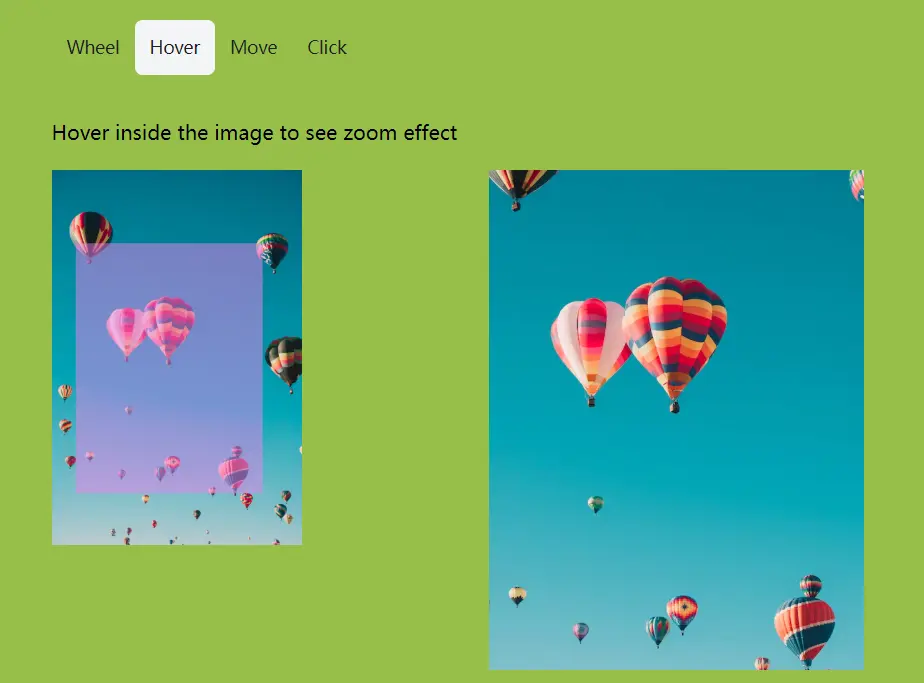
A little yet powerful framework agnostic headless library to zoom images on the web. It is a typical experience on e-commerce sites. Compatible with Preact, React, Svelte, Vanilla JS and Vue.
Features
- Zoom on wheel (scroll & pinch)
- Zoom on hover
- Zoom on move
- Zoom on click
7. react-quick-pinch-zoom

A React component that lets you zooming and dragging on any DOM element using multi-touch gestures on mobile devices and mouse-events\wheel on desktop devices.
8. react-native-zoom-reanimated
Zoom component on React Native + react-native-reanimated + react-native-gesture-handler.
Features:
- You can zoom any View, Image or whatever
- Can be used in FlatList (see Preview below)
- Double tap to zoom in or zoom out
- Automatically bounces to borders when paning outside of container and leaving the touch
9. Build iOS-Style Zoomable Grids – react-native-zoom-grid
A React Native component that creates resizable & zoomable grid layouts with interactive pinch-to-zoom functionality.
The component utilizes @shopify/flash-list for list virtualization and react-native-reanimated to handle smooth layout transitions on the UI thread.
It replicates the user experience found in the native iOS Photos app, where users pinch to adjust the number of columns dynamically.
Features
- Zoom Transitions: Changes column counts smoothly through gesture-driven animations.
- Performance Optimization: Executes animations on the UI thread using
react-native-reanimatedto maintain 60fps. - Gesture Control: Tracks precise pinch interactions via
react-native-gesture-handler. - Column Customization: Accepts an array of numbers to define valid column counts for each zoom level.
- Infinite Loading: Triggers
onEndReachedto fetch more data as the user scrolls. - Inverted Mode: Supports inverted scrolling for chat interfaces or reverse timelines.
10. react-prismazoom

A pan and zoom component for React, using CSS transformations. Depends only upon prop-types, react and react-dom modules. Works on both desktop and mobile.
Features
- Zoom with the mouse wheel or a two-finger pinch
- Zoom using double-click or double-tap
- Zoom on the selected area and center
- Pan with the mouse pointer or with one finger when zoomed-in
- Intuitive panning depending on available space when zoomed-in
- Adjusts cursor style to indicate in which direction the element can be moved
Conclusion:
We’ve tried to collect the most popular image zoom components in this article and hope that you’ll find something that meets your needs. At the very least, hopefully, you now have a better idea of how to implement image zooming using React.
See Also:
- Best Image Zoom Components For Vue.js
- 10 Best Image Zoom JavaScript & CSS Libraries
- 10 Best Image Zoom jQuery & Vanilla JavaScript Plugins