React loading spinner components provide visual feedback during data fetches or heavy computations. Users abandon applications that lack visual response, so developers must implement clear indicators to maintain engagement.
This article evaluates the top 10 loading indicator components for React and React Native based on community adoption, feature sets, and ease of implementation.
We selected these components to cover various use cases, including skeleton screens, traditional spinners, and progress bars.
You will find options for both web-based React projects and mobile React Native applications.
Originally Published July 13 2022, updated Dec 09 2025
Table Of Contents:
Best Loading Indicator Components For React:
1. Configurable Content Loader For React & React Native

A React & React Native component that uses SVG to create content loaders that simulate the structure of the content that will be loaded.
- Customizable: Feel free to change the colors, speed, sizes, and even RTL;
- Plug and play: with many presets to use;
- DIY: use the create-content-loader to create your own custom loaders easily;
- React Native support: same API, as same powerful features;
- Really lightweight: less than 2kB and 0 dependencies for web version;
2. react-loading-skeleton

Make beautiful, animated loading skeletons that automatically adapt to your app.
3. Loading Spinner Kit For React

A collection of loading spinner components for react apps.
4. Top Loading Bar For React

A very simple, highly customizable youtube-like react loader component.
5. Spinners React

9 awesome typescript-aware lightweight spinners built as react.js components.
Best Loading Indicator Components For React Native:
1. Modern Image Loading Experience For React Native – Blurhash

A compact representation of a placeholder for an image. Instead of displaying boring grey little boxes while your image loads, show a blurred preview until the full image has been loaded.
2. Animated Loading Spinner Overlay Component For React Native

An animated, customizable loading spinner overlay component for React Native.
3. Skeleton Loading Effect For React Native – SkeletonPlaceholder

A React Native library to easily create an amazing Skeleton loading effect on the app.
4. React Native Loader Kit
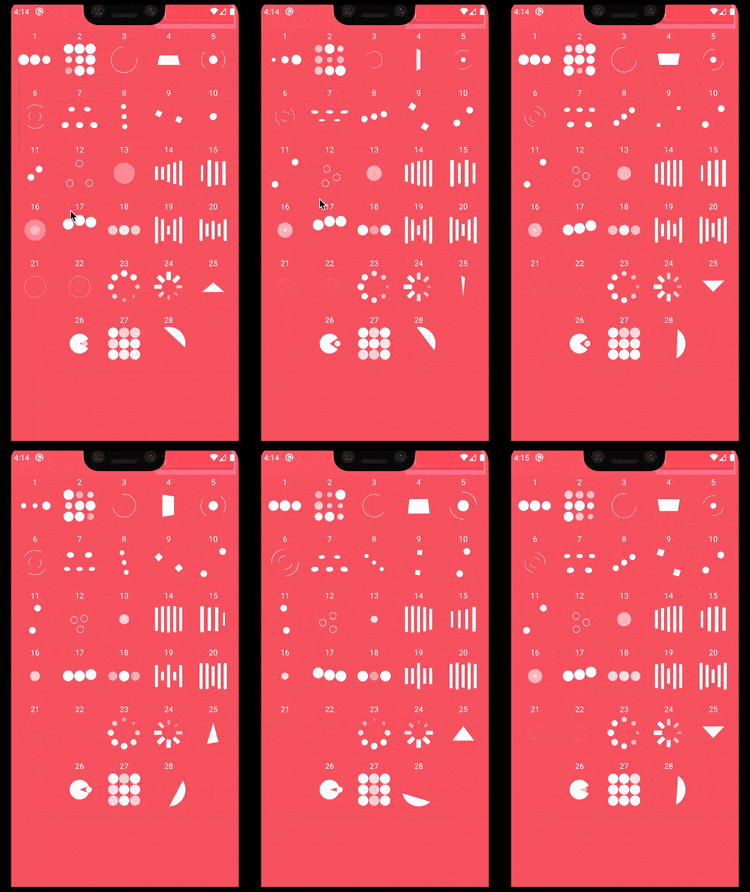
Purely native loader indicators for React Native.
5. Skeleton-style Loading Animation For React Native – reanimated-skeleton

A React Native component to create a customizable, animated, skeleton-style loading indicator using react-native-reanimated.
Which React Loading Spinner Should You Use?
For High-Performance Mobile Animations: Use React Native Loader Kit. It offloads animations to the native driver to prevent frame drops.
For Modern Data Fetching (Web): Use Configurable Content Loader or react-loading-skeleton. Skeleton screens reduce perceived wait times better than spinners.
For Page Transitions: Use Top Loading Bar. It provides a subtle indication of progress without blocking the UI.
For TypeScript Projects: Use Spinners React. It offers native TypeScript support and keeps bundle sizes low.
For Image-Heavy Mobile Apps: Use Blurhash. It improves the user experience by showing a blurred version of the image immediately.
For Blocking Mobile Actions: Use Animated Loading Spinner Overlay. It prevents users from interacting with the app while a critical process (like payment) completes.
If you are looking for more loading indicator component libraries for your next React project, you can also visit our official website Reactscript.com.
See Also:
- 7 Best Loading/Progress Indicator Libraries For Vue.js
- 10 Best Loading Spinner/Indicator JavaScript & CSS Libraries
- 80+ Best Pure CSS Loading Spinners For Front-end Developers
FAQs
Q. What is a React Loading Spinner?
A. A React loading spinner is a UI component that indicates an active background process. Developers use them to inform users that the application is fetching data or performing a calculation.
Q. Should I use a Spinner or a Skeleton Screen?
A. Use skeleton screens for initial page loads or large content blocks. Use spinners for small, quick actions like submitting a form or saving data.
Q. Do these libraries support TypeScript?
A. Some libraries, like Spinners React, explicitly support TypeScript. You should check the specific GitHub repository for the others, as support varies.
Q. Can I use React web loaders in React Native?
A. Generally, no. React Native requires components that render native views (like <View>), not HTML elements (like <div>). However, Configurable Content Loader supports both platforms.