A high-performance React Tree View component is essential for any app with hierarchical data.
Building one from scratch sounds easy at first. But you quickly run into performance issues and complex state bugs. Recursion logic gets messy, and rendering thousands of nodes often freezes the browser.
You need a library that handles these hard parts for you. We analyzed the ecosystem to find the most reliable options for 2026. This list ranks the top 7 libraries based on GitHub stars, update frequency, and community support.
Here are the best open-source components to handle your data structure.
Originally Published Sep 30 2020, updated Dec 08 2025
Comparison: Features vs Use Cases
| Library | Key Features | Best For |
|---|---|---|
| React Arborist | Virtualization, Drag & Drop, Inline Editing | Large Datasets & Performance |
| headless-tree | Headless UI, Search, Hotkeys, Virtualization Support | Custom UI & Complex Logic |
| React Complex Tree | Accessibility (a11y), Multi-selection, Unopinionated | Accessible Applications |
| React D3 Tree | D3 Integration, SVG Rendering, Custom Styling | Org Charts & Visual Graphs |
| rc-tree | Animations, Broad Browser Support | General Purpose Tree Views |
| Elegant Checkbox Tree | Simple Checkboxes, Multi-level Support | Sidebar Filters |
| React DnD TreeView | Drag & Drop API, Render Props | Custom Drag Interactions |
Top 7 React Tree View Components (2026 Edition)
1. React Arborist: Sortable Virtual Customizable Tree Component For React Apps
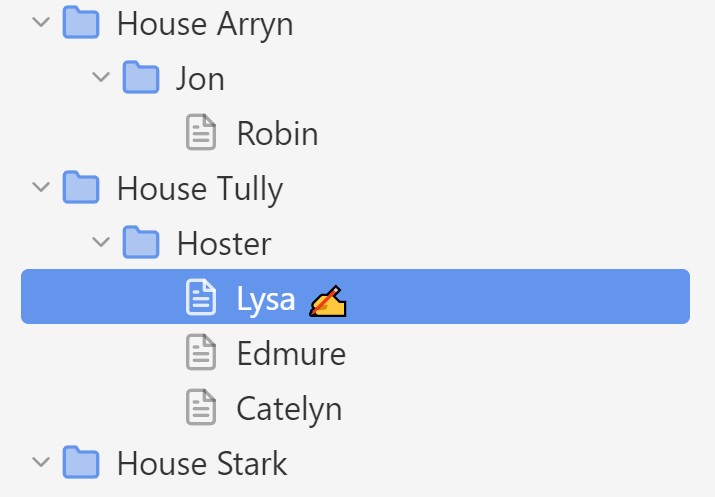
A library that provides all the common features for working with trees in React.
You can select one or many nodes to drag and drop into new positions, open and close folders, render an inline form for renaming, efficiently show thousands of items, and provide your own node renderer to control the style.
2. Draggable, Selectable, Accessible Tree Component – React Complex Tree

This is an unopinionated accessible tree component with support for live search, multi selection, and drag’n’drop.
3. rc-tree
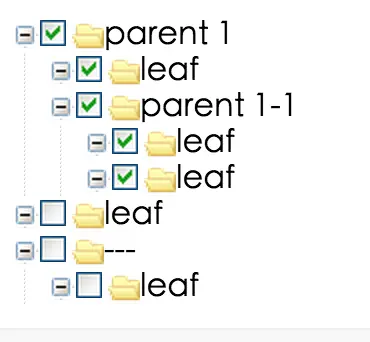
A feature-rich and animated tree component for React. Support all popular browsers, including Internet Explorer 9 and above.
4. React D3 Tree Component
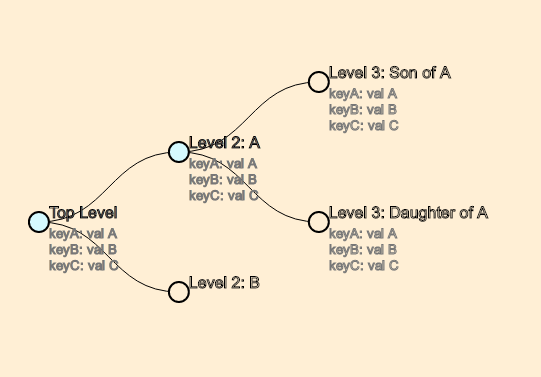
A React component that lets you represent hierarchical data (e.g. ancestor trees, organisational structure, package dependencies) as an animated & interactive tree graph by leveraging D3‘s tree layout.
Features:
- Interactive Tree Layout: Renders hierarchical data as a collapsible tree graph using D3’s
treelayout. - CSS Styling Control: Applies separate CSS class names to root, branch, and leaf nodes for targeted styling.
- Customizable Paths: Chooses link drawing styles between nodes, including diagonal, straight, elbow, or step paths.
- Built-in Event Handlers: Attaches click and mouse events to nodes and links for interactive behavior.
- Custom Node Rendering: Replaces the default SVG node element with any valid SVG or HTML via a custom render function.
- Orientation Support: Displays trees in both vertical and horizontal orientations.
- TypeScript Support: Includes full type definitions for all props and data structures.
5. Elegant Checkbox Tree For React

A simple, elegant, and multi-level checkbox tree view component for React.
6. headless-tree

Super-easy integration of complex tree components into React. Supports ordered and unordered drag-and-drop, extensive keybindings, search, renaming and more. Fully customizable and accessible.
- Simple Interface: Easy integration in React with full customizability of DOM
- Drag and Drop: Powerful ordered drag-and-drop, that can interact with external drag events
- Scalable: Headless Tree remains performant even with large trees
- Virtualization Support: Compatible with common virtualization library to support 100k+ items
- Hotkeys!: Lots of hotkeys, fully customizable
- Search Support: Typeahead anywhere in the tree to quickly search the entire tree
- Rename items: Optionally allow users to rename items inside the tree
- Manage State: Let Headless Tree manage tree state internally, or manage any part of it yourself
- Customize Behavior: Easily overwrite internal behavior like requiring double clicks on items to expand
- Customize Logic: Overwrite or expand any internal behavior of Headless Tree
- Async Data Support: Use synchronous or asynchronous data sources for your tree. Headless Tree comes with optional caching for async data
- Free of dependencies
7. React DnD TreeView

A draggable / droppable React-based treeview component. You can use render props to create each node freely.
Which React Tree Component Should You Use?
The right choice depends on your specific project requirements. You need to balance performance, features, and bundle size.
React Arborist and headless-tree excel at performance. They use virtualization to render large lists smoothly. Pick these options for file explorers with thousands of items.
React D3 Tree focuses on data visualization. It renders strict graphs like organizational charts. It uses the D3 engine for layout calculations.
React Complex Tree offers the best interaction features. It supports drag-and-drop and accessibility standards natively. This component fits complex dashboards well.
Test the live demos before you install a package. The correct library prevents future performance headaches.
Explore More Tree View Libraries
Our Tree View category contains additional resources for React and React Native. We also publish collections for other frameworks. Check these related articles for Vue.js and Vanilla JavaScript options:
- 10 Best Vue.js Tree View Components For Your App
- 10 Best Tree View Plugins In JavaScript And Pure CSS
FAQs
Q: What is a React Tree View Component?
A: A React Tree View component displays hierarchical data structures. It represents parent and child relationships in a nested list. Developers use these components to build file explorers, organizational charts, and multi-level sidebars.
Q: How do I handle large datasets with over 10,000 nodes?
You must use a library with virtualization support. React Arborist and headless-tree implement this feature. They only render the nodes currently visible in the viewport. This approach maintains high frame rates.
A: What is the difference between a “Headless” tree and a standard component?
A standard component comes with pre-defined styles. A headless library (like headless-tree) provides only the logic and state management. You write your own JSX and CSS.
Q: When should I use React D3 Tree?
A: Use React D3 Tree for data visualization. It creates organizational charts or dependency graphs using SVGs. Do not use it for interactive file explorers or sidebars.