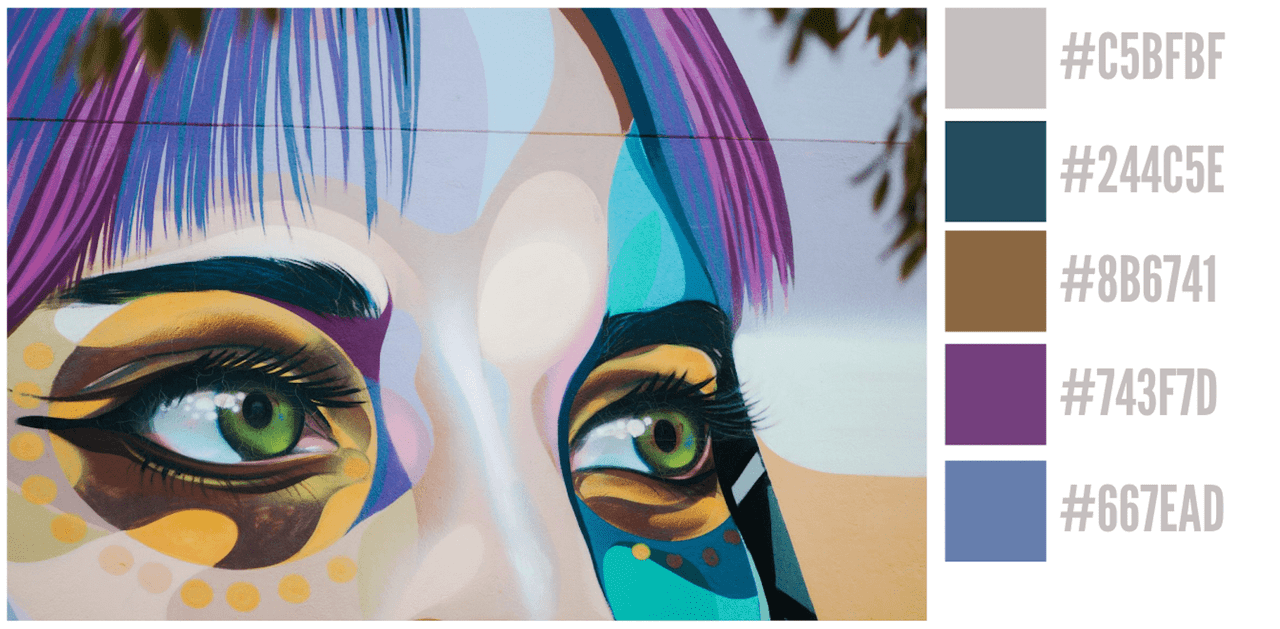
Description:
Color Thief is a React Native component designed for extracting prominent colors from images and SVGs inside your React Native applications.
It uses the React Native Skia rendering engine to perform high-performance color analysis. This allows you to identify dominant colors and generate complete color palettes from a given image source.
Features
- 🎨 Extract prominent colors and complete palettes from images and SVGs.
- 🚀 High-performance processing using React Native Skia for fast results.
- 📊 Obtain detailed color statistics including distribution and brightness analysis.
- 🔧 Configure extraction parameters like quality, color count, and white exclusion.
- 🎪 Support multiple color formats including HEX, RGB, HSL, and CSS keywords.
- 🖼️ Process various image sources from local files and remote URLs.
- 📱 Generate dominant colors or full palettes for different application needs.
Use Cases
- Dynamic UI Theming. Adjust the color scheme of a user interface element, like a music player’s background, to match the current album artwork.
- Profile Customization. Generate a colored border or background for a user’s avatar that complements the colors in their profile picture.
- Data Visualization. Create color palettes for charts and graphs that are thematically related to an accompanying image.
- Automated Content Tagging. Programmatically tag images with their dominant colors, which helps with content filtering and search functionality.
- Product Display Pages. Synchronize the background color of a product page with the dominant color of the product image for a cohesive look.
How to Use It
1.Add the component and its peer dependency, @shopify/react-native-skia, to your project.
npm install rn-color-thief @shopify/react-native-skia2. Import and create an instance of the ReactNativeColorThief class. You can then call its methods with an image URI. The getProminentColors method returns an array of the most common colors found in the image.
import { ReactNativeColorThief } from 'rn-color-thief';
import React, { useState, useEffect } from 'react';
import { View, Image, Text } from 'react-native';
const colorThief = new ReactNativeColorThief();
const imageUrl = 'https://example.com/image.jpg';
const extractImageColors = async () => {
  try {
    const prominentColors = await colorThief.getProminentColors(imageUrl);
    console.log('Extracted HEX Color:', prominentColors[0].formats.hex);
  } catch (error) {
    console.error('Failed to extract colors:', error);
  }
};
3. If you only need the single most dominant color, you can use the getDominantColor method. This is more direct than fetching the entire palette and selecting the first color.
const getSingleDominantColor = async () => {
  try {
    const dominantColor = await colorThief.getDominantColor(imageUrl);
    console.log('Dominant RGB Color:', dominantColor.formats.rgb);
  } catch (error) {
    console.error('Failed to get dominant color:', error);
  }
};
4. You can customize the behavior of the color extraction by passing a configuration object to the constructor. This allows you to adjust the balance between performance and quality. For example, a lower quality value will process the image faster.
quality: Sets the processing quality from 1 to 10; lower values are faster.colorCount: Specifies the number of prominent colors to extract from the image.minAlpha: Defines the minimum alpha (transparency) value a pixel must have to be included in the analysis.excludeWhite: A boolean that, if true, filters out near-white colors from the results.whiteThreshold: The numerical threshold used to define what is considered a “white” color whenexcludeWhiteis active.canvasSize: The internal canvas dimension used for image processing; smaller sizes are faster.
const customColorThief = new ReactNativeColorThief({
  quality: 8,           // A value from 1-10. Lower is faster.
  colorCount: 10,       // Number of colors to return in the palette.
  excludeWhite: false,  // Set to true to ignore white and near-white colors.
  canvasSize: 128,      // The internal canvas size for processing.
});
const palette = await customColorThief.getPalette(imageUrl);
8. Here is how you can integrate the library into a React Native component. This example fetches a palette from an image URI and uses the dominant color to style the component’s background.
const ColorfulImageCard = ({ imageURI }) => {
  const [backgroundColor, setBackgroundColor] = useState('#FFFFFF');
  const colorThief = new ReactNativeColorThief();
  useEffect(() => {
    const applyThemeFromImage = async () => {
      try {
        const dominantColor = await colorThief.getDominantColor(imageURI);
        setBackgroundColor(dominantColor.formats.hex);
      } catch (error) {
        console.error('Failed to apply theme:', error);
      }
    };
    applyThemeFromImage();
  }, [imageURI]);
  return (
    <View style={{ backgroundColor: backgroundColor, padding: 16 }}>
      <Image source={{ uri: imageURI }} style={{ width: 200, height: 200 }} />
      <Text>This card is themed from the image.</Text>
    </View>
  );
};
9. Full API methods.
getProminentColors(imageURI): Returns a promise that resolves to an array of the most prominentColorResultobjects.getDominantColor(imageURI): Returns a promise that resolves to the single most dominantColorResultobject.getPalette(imageURI): Returns a promise that resolves to aPaletteResultobject containing the dominant color, secondary colors, and the full color list.getColorsInFormat(imageURI, format): Returns a promise that resolves to an array of color strings in a specified format (e.g., ‘hex’, ‘rgbString’).getColorStatistics(imageURI): Returns a promise with detailed color analysis, including total colors and average brightness.isSupportedFormat(imageURI): Checks synchronously if the provided image format is supported and returns a boolean.updateConfig(newConfig): Updates the current instance’s configuration with new options.getConfig(): Returns the current configuration object of the instance.resetConfig(): Resets the instance’s configuration to its default settings.
FAQs
Q: What is the difference between getProminentColors and getPalette?
A: getProminentColors returns a simple array of the most frequent colors. getPalette returns a more structured object that contains all colors, a designated dominant color, and an array of secondary colors.
Q: How can I improve the performance of color extraction?
A: To improve performance, you can lower the quality and canvasSize values in the configuration. You should also create a single ReactNativeColorThief instance and reuse it for multiple operations instead of creating a new one each time.
Q: Can I extract colors from remote images?
A: Yes, the library accepts both local file paths and remote URLs as image sources.