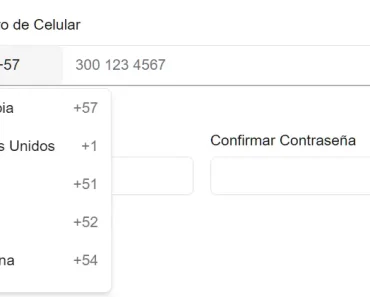
Description:
React Native Phone Entry is a phone number input component that provides a complete solution for collecting and validating international phone numbers with built-in country selection, automatic formatting, and real-time validation capabilities.
In short, it offers reliable phone number validation across different countries and regions based on Google’s libphonenumber library,
The component automatically handles country code detection, applies appropriate number formatting based on the selected country, and provides visual feedback through customizable themes.
It includes accessibility support and works across both iOS and Android platforms without additional configuration.
Features
- 🌍 International phone number input with interactive country picker modal.
- 📱 Automatic phone number formatting and masking based on selected country standards.
- 🔍 Dynamic country detection and mask adaptation when users type country codes directly.
- ✨ Complete visual customization through theme configuration and style props.
- 🎯 Real-time phone number validation using Google’s libphonenumber library.
- 🎨 Built-in dark theme support with customizable appearance options.
- ♿ Full accessibility support with proper screen reader compatibility.
- 🎛️ Configurable calling code editing permissions and dropdown visibility controls.
- 📦 Zero-configuration setup with sensible defaults for immediate use.
Use Cases
- User Authentication: Implement in sign-up and login forms to collect and verify user phone numbers.
- Two-Factor Authentication (2FA): Use it to set up 2FA, where users receive verification codes on their mobile devices.
- Contact Forms: Integrate into contact or support forms where a valid phone number is required for follow-up.
- User Profiles: Allow users to add or update their phone number in their profile settings.
- E-commerce Checkouts: Capture customer phone numbers during the checkout process for order updates and delivery notifications.
How to Use It
1. Install react-native-phone-entry with NPM or Yarn.
npm install react-native-phone-entryyarn add react-native-phone-entry2. Import the PhoneInput component and the isValidNumber utility function:
import React, { useState } from 'react';
import { SafeAreaView, StyleSheet, Text } from 'react-native';
import { PhoneInput, isValidNumber } from 'react-native-phone-entry';
const App = () => {
  const [phoneNumber, setPhoneNumber] = useState('');
  const [countryCode, setCountryCode] = useState('US');
  const [isValid, setIsValid] = useState(false);
  return (
    <SafeAreaView style={styles.container}>
      <Text style={styles.title}>Phone Number Entry</Text>
      <PhoneInput
        defaultValues={{
          countryCode: 'US',
          callingCode: '+1',
          phoneNumber: '+1',
        }}
        onChangeText={(text) => {
          setPhoneNumber(text);
          setIsValid(isValidNumber(text, countryCode));
        }}
        onChangeCountry={(country) => {
          setCountryCode(country.cca2);
        }}
      />
      <Text style={styles.status}>
        Is Valid: {isValid ? 'Yes' : 'No'}
      </Text>
    </SafeAreaView>
  );
};
const styles = StyleSheet.create({
  container: {
    flex: 1,
    justifyContent: 'center',
    alignItems: 'center',
    padding: 20,
  },
  title: {
    fontSize: 20,
    marginBottom: 20,
  },
  status: {
    marginTop: 10,
    fontSize: 16,
  },
});
export default App;
In this example, the component is rendered with default values. The onChangeText and onChangeCountry callbacks update the component’s state as the user interacts with the input. The isValidNumber function checks the validity of the phone number in real-time.
3. You can customize the component’s appearance and behavior using component props. The theme prop allows you to style different parts of the component, and countryPickerProps lets you configure the country picker modal.
import React from 'react';
import { SafeAreaView, StyleSheet } from 'react-native';
import { PhoneInput } from 'react-native-phone-entry';
const App = () => {
  return (
    <SafeAreaView style={styles.container}>
      <PhoneInput
        defaultValues={{
          countryCode: 'GB',
          callingCode: '+44',
          phoneNumber: '+44',
        }}
        autoFocus={true}
        countryPickerProps={{
          withFilter: true,
          withFlag: true,
        }}
        theme={{
          containerStyle: styles.phoneContainer,
          textInputStyle: styles.input,
          flagButtonStyle: styles.flagButton,
          codeTextStyle: styles.codeText,
          dropDownImageStyle: styles.dropDownImage,
          enableDarkTheme: true,
        }}
      />
    </SafeAreaView>
  );
};
const styles = StyleSheet.create({
  container: {
    flex: 1,
    justifyContent: 'center',
    backgroundColor: '#121212', // Dark background for dark theme
  },
  phoneContainer: {
    backgroundColor: '#333',
    borderColor: '#555',
    borderWidth: 1,
    borderRadius: 8,
  },
  input: {
    color: '#fff',
  },
  flagButton: {
    backgroundColor: '#444',
  },
  codeText: {
    color: '#fff',
  },
  dropDownImage: {
    tintColor: '#fff',
  },
});
export default App;
4. All possible component props:
defaultValues: Sets the initial values for the country code, calling code, and phone number.value: Manages the phone number input’s value as a controlled component.onChangeText: A function that is called when the phone number text changes.onChangeCountry: A function that is called when the selected country changes.autoFocus: Automatically focuses the input field when the component is mounted if set totrue.disabled: Disables the input field when set totrue.countryPickerProps: Passes props to the country picker modal for customization.maskInputProps: Passes props to the masked input component.theme: An object for configuring the component’s styling.hideDropdownIcon: Hides the dropdown arrow icon whentrue.renderCustomDropdown: Replaces the default dropdown arrow with a custom component.flagProps: Passes props to customize the country flag.dropDownImageProps: Passes props to customize the dropdown arrow image.isCallingCodeEditable: Controls whether the calling code portion of the input can be edited.
5. Theme Properties:
containerStyle: Styles the main component container.textInputStyle: Styles the text input field.codeTextStyle: Styles the calling code text.flagButtonStyle: Styles the flag button.dropDownImageStyle: Styles the dropdown arrow image.enableDarkTheme: Enables a dark theme for the component whentrue.
Related Resources
- React Native Country Picker Modal: The underlying country selection component used by React Native Phone Entry for country picker functionality.
- React Native Mask Input: Input masking library that provides the phone number formatting capabilities within the component.
- Google LibPhoneNumber: JavaScript port of Google’s phone number parsing and validation library used for accurate phone number validation.
- React Native OTP Entry: Companion library by the same author for OTP input verification after phone number collection.
FAQs
Q: Can I customize the appearance of the country picker modal?
A: Yes, you can customize the country picker through the countryPickerProps configuration. This allows you to control features like filtering, flag display, country name buttons, and alphabetical filtering options.
Q: Does the component work with controlled and uncontrolled inputs?
A: The component supports both patterns. You can use it as a controlled component by passing the value prop, or as an uncontrolled component using only the defaultValues and onChangeText callback.
Q: How accurate is the phone number validation?
A: The validation uses Google’s libphonenumber library, which is the industry standard for phone number validation. It provides accurate validation for phone numbers from all countries and handles various formatting styles.
Q: Can I disable editing of the country calling code?
A: Yes, you can control this behavior using the isCallingCodeEditable prop. Setting it to false prevents users from manually editing the calling code portion of the input.