Description:
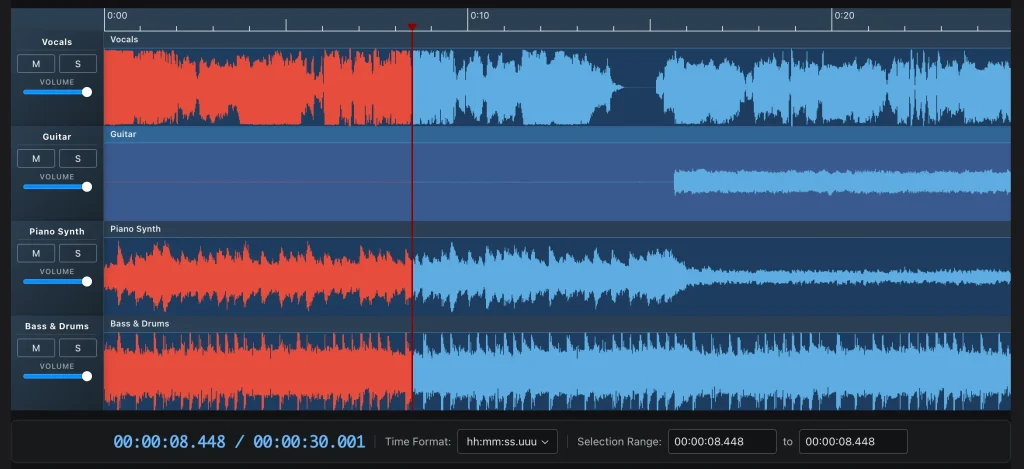
Waveform Playlist is a multi-track audio editor and player that runs in the browser using React, Tone.js, and the Web Audio API. The library renders canvas-based waveform visualizations, handles drag-and-drop clip positioning, and applies a suite of audio effects directly in the browser without a backend server.
The library is split across six focused packages. The main @waveform-playlist/browser package ships the React components, hooks, and context. Audio engine logic lives in @waveform-playlist/playout via Tone.js. Optional packages for recording, annotations, and spectrogram visualization slot in as separate installs. All packages ship with TypeScript definitions.
It works well for developers building browser-based DAW tools, stem player interfaces, or any web app that needs synchronized multi-track audio playback with visual waveforms.
Features
- 🎛️ Multi-track editing: Each track holds multiple audio clips. Clips support drag-to-move and trim operations directly on the canvas.
- 🌊 Canvas waveform rendering: Waveforms draw on HTML Canvas elements with zoom controls to adjust the samples-per-pixel ratio.
- 🎚️ 20+ audio effects: Reverb, delay, filters, and distortion are available through Tone.js’s effects chain, configurable per track or on the master output.
- 🎙️ AudioWorklet recording: The recording module captures microphone input using an AudioWorklet and renders a live waveform preview during capture.
- 💾 WAV export: The export hook writes full-mix or individual track renders to WAV files, including any applied effects.
- 📝 Time-synced annotations: The annotations package attaches text labels to specific timeline positions, with keyboard navigation support.
- 🎨 Theme customization: Dark and light mode are supported, with full control over color tokens and track height.
- 🟦 TypeScript support: All six packages include type definitions. No separate
@typesinstalls are needed.
Preview
Use Cases
- Stem player: Load separate vocal, drums, bass, and instrument tracks and let listeners mute or solo individual layers during playback.
- Browser DAW prototype: Build a lightweight digital audio workstation interface with real clip editing, effects, and WAV export.
- Podcast editor: Arrange recorded audio segments on a timeline, trim clips, and export the final mix as a WAV file directly from the browser.
- Music education tool: Display synced waveforms for multiple instrument tracks and attach time-coded annotations to highlight musical events for students.
How to Use It
Installation
Install the main package along with its required peer dependencies:
npm install @waveform-playlist/browser tone @dnd-kit/core @dnd-kit/modifiersIf react, react-dom, and styled-components are not already in your project, add them:
npm install react react-dom styled-componentsMinimal Setup
The fastest path to a working player uses the useAudioTracks hook with the provider pattern:
import {
  WaveformPlaylistProvider,
  Waveform,
  PlayButton,
  PauseButton,
  StopButton,
  useAudioTracks,
} from '@waveform-playlist/browser';
function App() {
  const { tracks, loading, error } = useAudioTracks([
    { src: '/audio/vocals.mp3', name: 'Vocals' },
    { src: '/audio/guitar.mp3', name: 'Guitar' },
  ]);
  if (loading) return <div>Loading audio...</div>;
  if (error) return <div>Error: {error}</div>;
  return (
    <WaveformPlaylistProvider
      tracks={tracks}
      samplesPerPixel={1024}
      waveHeight={128}
      timescale
      controls={{ show: true, width: 200 }}
    >
      <div style={{ display: 'flex', gap: '0.5rem', marginBottom: '1rem' }}>
        <PlayButton />
        <PauseButton />
        <StopButton />
      </div>
      <Waveform />
    </WaveformPlaylistProvider>
  );
}
useAudioTracks fetches and decodes the audio files. While decoding runs, loading stays true. On completion, tracks holds an array of ClipTrack objects ready to pass directly to the provider.
WaveformPlaylistProvider Props
WaveformPlaylistProvider manages playback state, track data, zoom level, scroll position, and cursor tracking. Every child component reads from its context.
<WaveformPlaylistProvider
  tracks={tracks}              // Required: ClipTrack[]
  samplesPerPixel={1024}       // Zoom level. Higher value = more zoomed out
  waveHeight={128}             // Height of each waveform track in pixels
  timescale                    // Renders the time ruler above the waveform
  controls={{ show: true, width: 200 }} // Shows per-track controls sidebar
>
  {/* All playlist components go here */}
</WaveformPlaylistProvider>
Manual Track Construction
For cases where you need to decode audio yourself or construct tracks programmatically, use createTrack and createClipFromSeconds from the core package:
import { createTrack, createClipFromSeconds } from '@waveform-playlist/core';
import { WaveformPlaylistProvider, Waveform, PlayButton } from '@waveform-playlist/browser';
import { useState, useEffect } from 'react';
function App() {
  const [tracks, setTracks] = useState([]);
  useEffect(() => {
    async function loadAudio() {
      const response = await fetch('/audio/song.mp3');
      const arrayBuffer = await response.arrayBuffer();
      const audioContext = new AudioContext();
      const audioBuffer = await audioContext.decodeAudioData(arrayBuffer);
      const track = createTrack({
        name: 'My Track',
        clips: [createClipFromSeconds({ audioBuffer, startTime: 0 })],
      });
      setTracks([track]);
    }
    loadAudio();
  }, []);
  return (
    <WaveformPlaylistProvider tracks={tracks}>
      <PlayButton />
      <Waveform />
    </WaveformPlaylistProvider>
  );
}
Loading Audio with Offset and Waveform Cache
useAudioTracks accepts additional options per track. The startTime property offsets a clip on the timeline. The waveformDataUrl property accepts a pre-computed BBC Peaks JSON file to skip client-side peak computation:
const { tracks, loading, error, progress } = useAudioTracks([
  {
    src: '/audio/vocals.mp3',
    name: 'Vocals',
    waveformDataUrl: '/audio/vocals.json', // Pre-computed waveform peaks
  },
  {
    src: '/audio/guitar.mp3',
    name: 'Guitar',
    startTime: 2, // Clip starts 2 seconds into the timeline
  },
]);
if (loading) {
  return <div>Loading... {Math.round(progress * 100)}%</div>;
}
Playback Controls and Volume
All pre-built buttons read from the playlist context and require no additional props. Import and place them inside WaveformPlaylistProvider:
import {
  PlayButton,
  PauseButton,
  StopButton,
  RewindButton,
  FastForwardButton,
  ZoomInButton,
  ZoomOutButton,
  MasterVolumeControl,
  AudioPosition,
} from '@waveform-playlist/browser';
function Controls() {
  return (
    <div style={{ display: 'flex', gap: '0.5rem', padding: '1rem' }}>
      <RewindButton />
      <PlayButton />
      <PauseButton />
      <StopButton />
      <FastForwardButton />
      <ZoomInButton />
      <ZoomOutButton />
      <MasterVolumeControl />
      <AudioPosition />
    </div>
  );
}
Complete Multi-Track Player Example
import {
  WaveformPlaylistProvider,
  Waveform,
  PlayButton,
  PauseButton,
  StopButton,
  RewindButton,
  FastForwardButton,
  ZoomInButton,
  ZoomOutButton,
  MasterVolumeControl,
  AudioPosition,
  useAudioTracks,
} from '@waveform-playlist/browser';
function MyPlaylist() {
  const { tracks, loading, error } = useAudioTracks([
    { src: '/audio/drums.mp3', name: 'Drums' },
    { src: '/audio/bass.mp3', name: 'Bass' },
    { src: '/audio/keys.mp3', name: 'Keys' },
    { src: '/audio/vocals.mp3', name: 'Vocals' },
  ]);
  if (loading) return <div>Loading tracks...</div>;
  if (error) return <div>Error: {error}</div>;
  return (
    <WaveformPlaylistProvider
      tracks={tracks}
      samplesPerPixel={1024}
      waveHeight={100}
      timescale
      controls={{ show: true, width: 180 }}
    >
      <div style={{ display: 'flex', gap: '0.5rem', padding: '1rem' }}>
        <RewindButton />
        <PlayButton />
        <PauseButton />
        <StopButton />
        <FastForwardButton />
        <ZoomInButton />
        <ZoomOutButton />
        <MasterVolumeControl />
        <AudioPosition />
      </div>
      <Waveform />
    </WaveformPlaylistProvider>
  );
}
export default MyPlaylist;
Annotations Package
Install the optional annotations package:
npm install @waveform-playlist/annotationsWrap the Waveform component with AnnotationProvider and pass an annotationList prop to the provider:
import { AnnotationProvider } from '@waveform-playlist/annotations';
<WaveformPlaylistProvider
  tracks={tracks}
  annotationList={{ annotations, editable: true }}
>
  <AnnotationProvider>
    <Waveform />
  </AnnotationProvider>
</WaveformPlaylistProvider>
annotations is an array of annotation objects with at minimum a start time and text field. Setting editable: true turns on in-line editing of annotation labels.
Recording Package
Install the recording package:
npm install @waveform-playlist/recordingUse useIntegratedRecording inside WaveformPlaylistProvider. The hook handles microphone access, AudioWorklet capture, and merging the recorded clip into the track state:
import { useIntegratedRecording, RecordButton, VUMeter } from '@waveform-playlist/recording';
function RecordingControls({ tracks, setTracks, selectedTrackId }) {
  const {
    isRecording,
    startRecording,
    stopRecording,
    requestMicAccess,
    level,
  } = useIntegratedRecording(tracks, setTracks, selectedTrackId);
  return (
    <>
      <button onClick={requestMicAccess}>Enable Mic</button>
      <RecordButton
        isRecording={isRecording}
        onStart={startRecording}
        onStop={stopRecording}
      />
      <VUMeter level={level} />
    </>
  );
}
// Place the recording controls inside the provider
<WaveformPlaylistProvider tracks={tracks}>
  <RecordingControls
    tracks={tracks}
    setTracks={setTracks}
    selectedTrackId={selectedTrackId}
  />
  <Waveform />
</WaveformPlaylistProvider>
The AudioWorklet setup requires a separate configuration step. See the recording guide for the worklet file setup.
Spectrogram Package
Install the spectrogram package:
npm install @waveform-playlist/spectrogramWrap the Waveform component with SpectrogramProvider and pass a configuration object and a color map name:
import { SpectrogramProvider } from '@waveform-playlist/spectrogram';
<WaveformPlaylistProvider tracks={tracks}>
  <SpectrogramProvider config={spectrogramConfig} colorMap="viridis">
    <Waveform />
  </SpectrogramProvider>
</WaveformPlaylistProvider>
FFT computation runs in a Web Worker and renders using the specified color map.
CDN Usage
For quick prototyping outside a build system, load the UMD bundle from a CDN:
<script src="https://unpkg.com/@waveform-playlist/browser/dist/index.umd.js"></script>CDN usage is not recommended for production applications.
API Reference
WaveformPlaylistProvider Props
| Prop | Type | Required | Description |
|---|---|---|---|
tracks | ClipTrack[] | Yes | Array of track objects created with createTrack or useAudioTracks |
samplesPerPixel | number | No | Controls zoom level. Higher values zoom out. Default is 1024 |
waveHeight | number | No | Height of each waveform track in pixels |
timescale | boolean | No | Renders the time ruler above waveforms |
controls | { show: boolean; width: number } | No | Toggles and sizes the per-track controls sidebar |
annotationList | { annotations: Annotation[]; editable: boolean } | No | Supplies annotation data when using the annotations package |
Core Hooks
useAudioTracks(sources)
Fetches and decodes audio files from URLs and returns track-ready data.
| Return Value | Type | Description |
|---|---|---|
tracks | ClipTrack[] | Decoded tracks ready for the provider |
loading | boolean | true while any file is still decoding |
error | string | null | Error message if any file fails to load |
progress | number | Decimal from 0 to 1 representing overall load progress |
Each source object accepts:
| Property | Type | Description |
|---|---|---|
src | string | URL of the audio file |
name | string | Display name for the track |
startTime | number | Offset in seconds from the timeline start |
waveformDataUrl | string | Optional URL to a pre-computed BBC Peaks JSON file |
usePlaylistControls()
| Return Value | Type | Description |
|---|---|---|
play | () => void | Starts playback from current cursor position |
pause | () => void | Pauses playback |
stop | () => void | Stops and resets cursor to zero |
seek | (time: number) => void | Moves cursor to the specified time in seconds |
isPlaying | boolean | true during active playback |
useZoomControls()
| Return Value | Type | Description |
|---|---|---|
zoomIn | () => void | Decreases samples-per-pixel value |
zoomOut | () => void | Increases samples-per-pixel value |
samplesPerPixel | number | Current zoom level |
useDynamicEffects()
| Return Value | Type | Description |
|---|---|---|
masterEffectsFunction | function | Callback that returns the active Tone.js effects chain |
toggleEffect | (id: string) => void | Activates or deactivates an effect by ID |
updateParameter | (id: string, param: string, value: number) => void | Updates a parameter on an active effect |
useExportWav()
| Return Value | Type | Description |
|---|---|---|
exportWav | (options?: ExportOptions) => Promise<void> | Renders the mix or individual tracks to a WAV file |
isExporting | boolean | true during an active export render |
progress | number | Decimal from 0 to 1 representing export progress |
useIntegratedRecording(tracks, setTracks, selectedTrackId)
Aailable from @waveform-playlist/recording.
| Return Value | Type | Description |
|---|---|---|
isRecording | boolean | true during an active recording session |
startRecording | () => void | Begins capturing from the microphone |
stopRecording | () => void | Ends capture and appends the clip to the selected track |
requestMicAccess | () => void | Requests microphone permission from the browser |
level | number | Current VU meter level for display purposes |
Core Utilities
| Function | Package | Description |
|---|---|---|
createTrack(options) | @waveform-playlist/core | Constructs a ClipTrack object from a name and array of clips |
createClipFromSeconds(options) | @waveform-playlist/core | Constructs a clip from a decoded AudioBuffer and a startTime in seconds |
Package Reference
| Package | Description |
|---|---|
@waveform-playlist/browser | Main React components, hooks, and context |
@waveform-playlist/core | Types, utilities, and clip/track construction helpers |
@waveform-playlist/ui-components | Styled buttons, sliders, and other UI elements |
@waveform-playlist/playout | Tone.js audio engine |
@waveform-playlist/annotations | Optional time-synced annotation support |
@waveform-playlist/recording | Optional microphone recording via AudioWorklet |
@waveform-playlist/spectrogram | Optional FFT-based spectrogram visualization |
Related Resources
- Tone.js: The Web Audio framework powering Waveform Playlist’s audio engine and effects chain.
- @dnd-kit: The drag-and-drop toolkit handling clip repositioning and annotation editing in the timeline.
- wavesurfer.js: An alternative waveform visualization library, useful for single-track players and simpler playback interfaces.
- Web Audio API (MDN): The browser API that Waveform Playlist builds on for audio decoding, routing, and export.
FAQs
Q: Does Waveform Playlist work with Next.js?
A: Yes, but the Web Audio API requires a browser context. Wrap any component that instantiates AudioContext or calls useAudioTracks in a dynamic import with ssr: false, or gate the import behind a typeof window !== 'undefined' check.
Q: How do you preload waveform peak data to speed up rendering?
A: Pass a waveformDataUrl pointing to a BBC Peaks-format JSON file in each source object sent to useAudioTracks. The library reads the pre-computed peaks and skips client-side computation, which reduces time-to-render noticeably for long audio files.
Q: Can you apply effects to individual tracks instead of the master output?
A: Yes. The useDynamicEffects hook targets the master chain in the minimal setup, but Tone.js routing at the playout layer supports per-track effect chains. You configure this through the @waveform-playlist/playout package’s audio graph API.
Q: What AudioWorklet setup is required for recording?
A: The recording module requires a worklet processor file served from your origin. The recording guide covers the exact file to create and the path to register it under. This step cannot be skipped because browsers require worklet scripts to load from the same origin.