Description:
React Cookie Manager is a React component for implementing GDPR- and CCPA-compiant cookie consent that prioritizes user privacy and developer convenience.
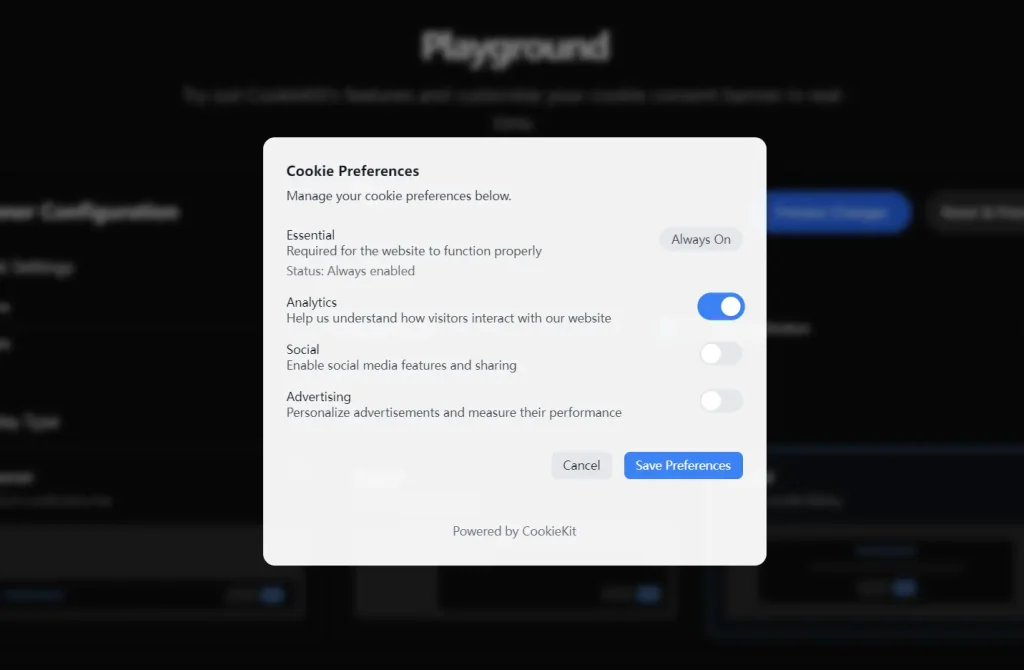
You can use it to add a cookie consent banner, popup, or modal to your website. It allows users to give granular consent for different categories of cookies, such as Analytics, Social, and Advertising.
Features
- 🌍 Geolocation based display shows the consent banner only in regulated regions.
- 🛡️ Automatic blocking of common tracking scripts and third party iframes.
- 🎯 Granular controls for cookie categories like Analytics, Social, and Advertising.
- 🎨 Support for both light and dark themes to match your application’s design.
- 📱 A responsive user interface that works well on all device sizes.
- 🔧 Extensive customization options for styling and functionality.
- 🍪 A floating button gives users easy access to their cookie preferences at any time.
Preview
How to Use It
1. Install the package in your React project.
npm install react-cookie-manager2. Wwrap your entire application with the CookieManager provider. This setup allows the component to manage consent across your whole application.
import React from 'react';
import { createRoot } from 'react-dom/client';
import { CookieManager } from 'react-cookie-manager';
import App from './App';
const root = createRoot(document.getElementById('root'));
root.render(
  <React.StrictMode>
    <CookieManager>
      <App />
    </CookieManager>
  </React.StrictMode>
);
3. Configure the component by passing props to the CookieManager. For example, you can add translations, a link to your privacy policy, and choose a display type.
<CookieManager
  translations={{
    title: "Our Use of Cookies",
    message: "We use cookies to improve your website experience and analyze our traffic.",
    buttonText: "Accept All",
    declineButtonText: "Decline All"
  }}
  privacyPolicyUrl="/privacy-policy"
  displayType="banner"
  theme="dark"
>
  <App />
</CookieManager>
4. For more advanced control, you can use the useCookieConsent hook inside any of your components. This hook provides access to the user’s consent status and functions to manage the UI. You can show the consent banner again or open the preferences modal programmatically.
import React from 'react';
import { useCookieConsent } from 'react-cookie-manager';
function AnalyticsOptIn() {
  const { detailedConsent, openPreferencesModal } = useCookieConsent();
  const isAnalyticsAllowed = detailedConsent?.Analytics?.consented;
  return (
    <div>
      <p>Analytics Consent: {isAnalyticsAllowed ? 'Given' : 'Not Given'}</p>
      <button onClick={openPreferencesModal}>
        Change Cookie Settings
      </button>
    </div>
  );
}
5. Here are the props available for the CookieManager component:
- initialPreferences: An object that sets the initial consent state for the cookie categories.
- children: Your application’s components.
- translations: An object or i18next function for custom text.
- translationI18NextPrefix: A string prefix for i18next translation keys.
- showManageButton: A boolean that shows or hides the “Manage Cookies” button. Defaults to
true. - enableFloatingButton: A boolean to enable a persistent floating button for managing settings. Defaults to
false. - privacyPolicyUrl: A string containing the URL for your privacy policy link.
- cookieKey: The string name for the cookie that stores user consent. Defaults to
'cookie-consent'. - expirationDays: A number that sets the consent cookie’s expiration period in days. Defaults to
365. - displayType: A string that determines the UI style, either
'banner','popup', or'modal'. Defaults to'popup'. - theme: A string for the color scheme, either
'light'or'dark'. Defaults to'light'. - disableAutomaticBlocking: A boolean to turn off the automatic prevention of tracking scripts. Defaults to
false. - blockedDomains: An array of additional string domains or hosts to block.
- cookieKitId: A string for your CookieKit.io integration ID to enable analytics and consent storage.
- userId: An optional string to identify a user for CookieKit analytics.
- onManage: A callback function that runs when a user saves their cookie preferences.
- onAccept: A callback function that executes when a user accepts all cookies.
- onDecline: A callback function that runs when a user declines all cookies.
- classNames: An object with custom CSS class names for styling the component’s elements.
- cookieCategories: An object to control which cookie categories (
Analytics,Social,Advertising) are displayed.
Related Resources
- GDPR.eu Compliance Guide – Official GDPR guidelines for understanding legal requirements.
- MDN HTTP Cookies Documentation – Technical reference for cookie mechanisms and security.
FAQs
Q: How does React Cookie Manager handle users from different geographic regions?
A: The library includes automatic geolocation detection that displays consent banners only to users in regulated jurisdictions like the EU, UK, Brazil, and California. You can disable this feature with the disableGeolocation prop.
Q: Can I customize the appearance to match my site’s design?
A: Yes, the component provides styling options through CSS classes. The classNames prop allows you to override styles for every UI element, and it works with popular CSS frameworks like Tailwind CSS and Bootstrap.
Q: What tracking services does it block automatically?
A: The library automatically blocks common trackers including Google Analytics, Facebook Pixel, and embedded content from YouTube, Vimeo, Google Maps, and social media platforms before consent is obtained.
Q: Does it work with Next.js App Router?
A: Yes, React Cookie Manager fully supports Next.js with the App Router. You need to implement it within a client component that wraps your application in the root layout.
Q: How do I track consent events for compliance reporting?
A: You can use the onAccept, onDecline, and onManage callback props to log consent events. For detailed analytics, integrate with CookieKit.io using the cookieKitId prop to access real-time consent dashboards.

