Description:
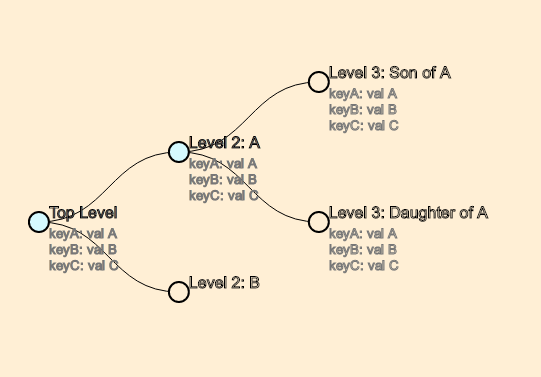
React D3 Tree is a data visualization component that renders hierarchical data as interactive graphs. It combines the layout calculation engine of D3 with the component-based rendering of React. You can build organizational charts, family trees, or file directory visualizations without managing complex SVG mathematics manually.
The component accepts nested JSON data and converts it into a navigable node-link diagram. It’s highly customizable through CSS classes and custom render functions. You can replace default SVG circles with specific elements or use foreignObject to embed HTML directly into the tree nodes.
Features
- 🌳 Interactive Tree Layout: Renders hierarchical data as a collapsible tree graph using D3’s
treelayout. - 🎨 CSS Styling Control: Applies separate CSS class names to root, branch, and leaf nodes for targeted styling.
- 🔗 Customizable Paths: Chooses link drawing styles between nodes, including diagonal, straight, elbow, or step paths.
- 🖱️ Built-in Event Handlers: Attaches click and mouse events to nodes and links for interactive behavior.
- 🧩 Custom Node Rendering: Replaces the default SVG node element with any valid SVG or HTML via a custom render function.
- 📏 Orientation Support: Displays trees in both vertical and horizontal orientations.
- 📦 TypeScript Support: Includes full type definitions for all props and data structures.
Preview
Use Cases
- Organizational Charts: Display company structures with expandable branches for departments and teams.
- File System Explorers: Visualize directory depth and file locations within a storage system.
- Decision Trees: Map out logic flows or dialogue options for interactive applications.
- Sitemap Visualization: Render the parent-child relationships between pages in a website architecture.
How to Use react-d3-tree
1. Install the react-d3-tree package with npm.
npm install react-d3-tree2. Define your data using a specific structure. Each node requires a name property and an optional children array. The attributes object holds extra details like job titles or IDs.
Wrap the Tree component in a container with a defined width and height. The tree expands to fill this space.
import React from 'react';
import Tree from 'react-d3-tree';
const orgData = {
  name: 'CEO',
  attributes: {
    id: '101',
  },
  children: [
    {
      name: 'VP of Engineering',
      attributes: {
        department: 'Tech',
      },
      children: [
        {
          name: 'Team Lead',
          attributes: {
            department: 'Frontend',
          },
        },
        {
          name: 'Team Lead',
          attributes: {
            department: 'Backend',
          },
        },
      ],
    },
  ],
};
export default function OrgChart() {
  return (
    // The container must have defined dimensions
    <div id="tree-container" style={{ width: '100%', height: '500px' }}>
      <Tree data={orgData} />
    </div>
  );
}
3. You can assign CSS classes to different node types. This helps users distinguish between the root node, branch nodes (parents), and leaf nodes (end points).
CSS:
.node-root circle {
  fill: #e74c3c;
}
.node-branch circle {
  fill: #f1c40f;
}
.node-leaf circle {
  fill: #2ecc71;
}
Component:
<Tree
  data={orgData}
  rootNodeClassName="node-root"
  branchNodeClassName="node-branch"
  leafNodeClassName="node-leaf"
/>
4. The component draws links between nodes using SVG paths. You can change the shape of these lines using the pathFunc prop. Options include diagonal, elbow, straight, or step.
You can also apply classes to links dynamically based on their data.
const getLinkClass = ({ source, target }, orientation) => {
  // Return a specific class if the link targets a leaf node
  return target.children ? 'link-branch' : 'link-leaf';
};
<Tree
  data={orgData}
  pathFunc="step"
  pathClassFunc={getLinkClass}
/>
5. Available Tree props.
static defaultProps: Partial<TreeProps> = {
  onNodeClick: undefined,
  onNodeMouseOver: undefined,
  onNodeMouseOut: undefined,
  onLinkClick: undefined,
  onLinkMouseOver: undefined,
  onLinkMouseOut: undefined,
  onUpdate: undefined,
  orientation: 'horizontal',
  translate: { x: 0, y: 0 },
  pathFunc: 'diagonal',
  pathClassFunc: undefined,
  transitionDuration: 500,
  depthFactor: undefined,
  collapsible: true,
  initialDepth: undefined,
  zoomable: true,
  draggable: true,
  zoom: 1,
  scaleExtent: { min: 0.1, max: 1 },
  nodeSize: { x: 140, y: 140 },
  separation: { siblings: 1, nonSiblings: 2 },
  shouldCollapseNeighborNodes: false,
  svgClassName: '',
  rootNodeClassName: '',
  branchNodeClassName: '',
  leafNodeClassName: '',
  renderCustomNodeElement: undefined,
  enableLegacyTransitions: false,
  hasInteractiveNodes: false,
  dimensions: undefined,
  centeringTransitionDuration: 800,
  dataKey: undefined,
};
6. Available Link props.
interface LinkProps {
  linkData: TreeLinkDatum;
  orientation: Orientation;
  pathFunc: PathFunctionOption | PathFunction;
  pathClassFunc?: PathClassFunction;
  enableLegacyTransitions: boolean;
  transitionDuration: number;
  onClick: LinkEventHandler;
  onMouseOver: LinkEventHandler;
  onMouseOut: LinkEventHandler;
}
7. Available Node props.
type NodeProps = {
  data: TreeNodeDatum;
  position: Point;
  hierarchyPointNode: HierarchyPointNode<TreeNodeDatum>;
  parent: HierarchyPointNode<TreeNodeDatum> | null;
  nodeClassName: string;
  nodeSize: {
    x: number;
    y: number;
  };
  orientation: Orientation;
  enableLegacyTransitions: boolean;
  transitionDuration: number;
  renderCustomNodeElement: RenderCustomNodeElementFn;
  onNodeToggle: (nodeId: string) => void;
  onNodeClick: NodeEventHandler;
  onNodeMouseOver: NodeEventHandler;
  onNodeMouseOut: NodeEventHandler;
  subscriptions: object;
  centerNode: (hierarchyPointNode: HierarchyPointNode<TreeNodeDatum>) => void;
  handleAddChildrenToNode: (nodeId: string, children: RawNodeDatum[]) => void;
};
Related Resources
- D3.js: The powerful data visualization library that React D3 Tree uses for its layout calculations.
- React Flow: A library for building interactive node-based graphs and editors, suitable for more complex diagrams.
- Visx: Contains low-level visualization primitives for building custom D3 charts in React.
Q: How do I prevent nodes from collapsing when clicked?
A: Set the collapsible prop to false. Your onNodeClick handler will still execute, but the node’s expanded state will not change.
Q: Can I use HTML inside the tree nodes?
A: Yes. Use the renderCustomNodeElement prop and return an SVG <foreignObject> element containing your HTML.
Q: What data format does the component require?
A: Each node must be an object with a name property. Nodes can have an optional children array of more nodes and an optional attributes object for metadata.
Q: How do I change the line style between nodes?
A: Use the pathFunc prop. Choose a built-in option like 'straight' or 'step', or supply your own drawing function.
Changelog
v3.6.6 (12/03/2025)
- Update dependencies