Description:
react-native-session-timeout is a React Native library that detects user inactivity and manages session expiration. It uses a native module for accurate timekeeping across Android and iOS.
The library wraps your application with touch detection to monitor for taps, scrolls, and gestures. You configure a timeout duration and receive callbacks for warnings and session expiry.
Features
- ✅ Inactivity Tracking: The library monitors taps, swipes, and scrolls to detect user presence.
- ✅ Android Compatibility: It functions correctly on Android 10+ without background timer restrictions.
- ✅ Lifecycle Management: The system pauses or continues timers when the app moves between foreground and background states.
- ✅ Warning System: It triggers a countdown timer and exposes state variables to build custom warning interfaces.
- ✅ Performance Optimization: It uses native timers to maintain accuracy even when the JavaScript thread faces heavy loads.
Preview
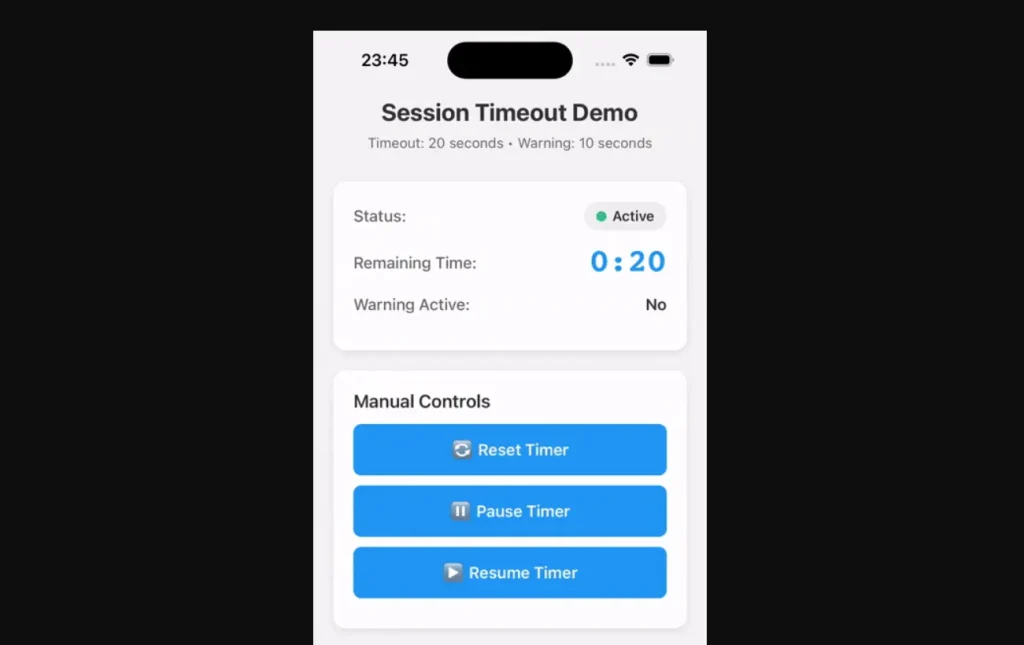
Use Cases
- Banking Applications: Log out users automatically to meet PCI-DSS and SOC2 security standards.
- Healthcare Portals: Protect patient data by terminating idle sessions in compliance with HIPAA.
- Enterprise Tools: Enforce corporate security policies that require frequent re-authentication.
- E-commerce Carts: Clear abandoned sessions or shopping carts after a specific period of inactivity.
How to Use It
Installation
Add the package to your project using your preferred package manager.
npm install react-native-session-timeout
# or
yarn add react-native-session-timeout
For iOS, navigate to the pod directory and install the native dependencies.
cd ios && pod installBasic Configuration
Wrap your root component with SessionTimeoutProvider. This component initializes the monitoring system and handles the global timer.
import React from 'react';
import { SessionTimeoutProvider } from 'react-native-session-timeout';
import YourApp from './YourApp';
function App() {
  const handleTimeout = () => {
    console.log('Session timed out. Logging out...');
    // Execute logout logic here
  };
  return (
    <SessionTimeoutProvider
      timeout={300000} // 5 minutes (in milliseconds)
      warningDuration={60000} // Warn 1 minute before timeout
      onTimeout={handleTimeout}
      onWarning={(remaining) => {
        console.log(`Warning: ${remaining}ms left`);
      }}
    >
      <YourApp />
    </SessionTimeoutProvider>
  );
}
Displaying a Warning UI
Access the timer state within any child component using the useSessionTimeout hook. This allows you to show a modal or banner when the session nears expiration.
import React from 'react';
import { View, Text, Button, Modal } from 'react-native';
import { useSessionTimeout } from 'react-native-session-timeout';
function SessionWarning() {
  const { isWarning, remainingTime, resetTimer } = useSessionTimeout();
  return (
    <Modal visible={isWarning} transparent animationType="fade">
      <View style={{ flex: 1, justifyContent: 'center', alignItems: 'center', backgroundColor: 'rgba(0,0,0,0.5)' }}>
        <View style={{ backgroundColor: 'white', padding: 20, borderRadius: 10 }}>
          <Text>Session Expiring</Text>
          <Text>
            Time remaining: {Math.floor(remainingTime / 1000)} seconds
          </Text>
          <Button title="Keep me signed in" onPress={resetTimer} />
        </View>
      </View>
    </Modal>
  );
}
Handling Background States
You can configure the provider to pause the timer when the user minimizes the app. Set the pauseOnBackground prop to true if you want the timer to stop while the app is inactive.
<SessionTimeoutProvider
  timeout={300000}
  onTimeout={handleTimeout}
  pauseOnBackground={true} // Pauses timer when app is backgrounded
>
  <YourApp />
</SessionTimeoutProvider>
Preventing Unwanted Resets
The library wraps the app in a PanResponder to detect touches. If specific UI elements should not reset the timer (for example, a “Pause Timer” button), wrap them in a View that captures the touch event.
import { View, TouchableOpacity, Text } from 'react-native';
// This button will NOT reset the session timer
<View onStartShouldSetResponder={() => true}>
  <TouchableOpacity onPress={() => console.log('Timer not reset')}>
    <Text>Passive Action</Text>
  </TouchableOpacity>
</View>
API Reference
SessionTimeoutProvider Props
| Prop | Type | Required | Description |
|---|---|---|---|
timeout | number | Yes | Total duration in milliseconds before the session expires. |
onTimeout | () => void | Yes | Function called when the timer reaches zero. |
warningDuration | number | No | Duration in milliseconds before timeout to trigger warning state (default: 60000). |
onWarning | (remaining: number) => void | No | Function called when the warning period begins. |
enabled | boolean | No | Toggles the timeout functionality (default: true). |
pauseOnBackground | boolean | No | Pauses the timer when the app enters the background (default: false). |
useSessionTimeout Hook Return Values
| Property | Type | Description |
|---|---|---|
isWarning | boolean | Returns true if the timer is within the warning duration. |
remainingTime | number | Current milliseconds remaining until timeout. |
isActive | boolean | Indicates if the timer is currently running. |
resetTimer | () => void | Manually resets the timer to the full duration. |
pauseTimer | () => void | Pauses the countdown. |
resumeTimer | () => void | Resumes the countdown from the paused state. |
Related Resources
- React Native Async Storage: Persist data locally to handle session tokens and user state across app restarts.
- React Navigation: Manage screen transitions and reset navigation stacks upon session timeout.
- React Native AppState: Monitor the current state of the application (active, background, or inactive) directly.
FAQs
Q: Does this work on Android?
A: Yes, the library supports Android 10 and higher. It uses native modules to handle timing correctly without being killed by aggressive battery optimizations.
Q: Can I manually reset the timer without a touch event?
A: Yes, you can call the resetTimer function returned by the useSessionTimeout hook to reset the countdown programmatically.
Q: What happens when the app goes to the background?
A: By default, the timer continues running. You can change this behavior by setting the pauseOnBackground prop to true on the provider.
Q: Does scrolling a list reset the timer?
A: Yes, the library detects scrolls, swipes, and gestures on components like FlatList or ScrollView and resets the timer automatically.