Description:
fude is a React component that handles rich text input with two simultaneous interaction modes: inline @ mention tag chips and AI-powered ghost text autocomplete.
It’s ideal for projects where users need to reference structured items inside free text, such as AI chat inputs, command prompts, or task description fields.
Features
- Typing
@opens a dropdown. Selecting an item converts it to a chip that flows inline with the surrounding text. Multiple chips can coexist in a single input. - After the user pauses typing, predicted continuation text appears after the cursor. Tab accepts the top suggestion. Shift+Tab cycles through all returned suggestions.
fuzzyFilter(query, items)handles local list filtering insideonFetchMentions. Remote API calls work exactly the same way.- Arrow keys navigate the dropdown. Tab and Shift+Tab step through autocomplete suggestions. Double Backspace removes a chip (first press highlights, second press deletes).
classNamesandstylesprops target individual parts: the input, chip wrapper, chip shell, highlighted chip state, dropdown, dropdown items, ghost text, and tooltip.
Preview
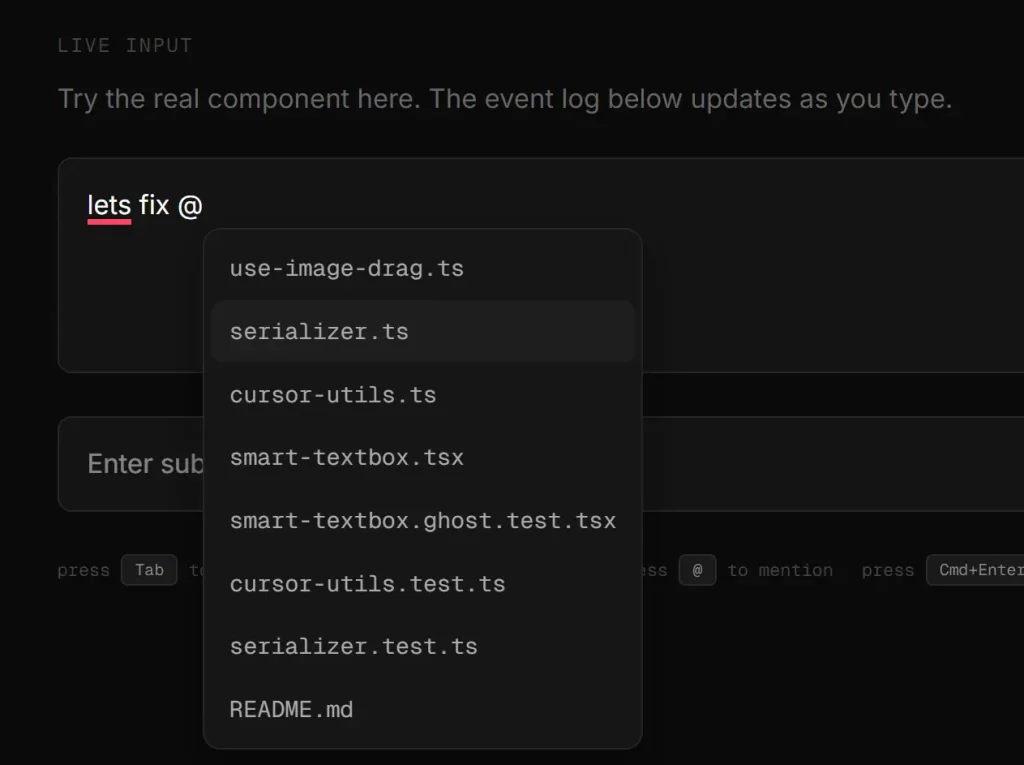
Use Cases
- AI assistant chat inputs: Attach file references or user mentions as structured tags while typing a message, then send the segment array directly to an LLM with structured context intact.
- Code editor prompts: Reference source files by name using
@chips, and use AI autocomplete to suggest code continuations based on trailing plain text context. - Task and issue trackers: Tag team members or linked issues inline inside task descriptions, with the segment model keeping IDs attached to each mention for API submission.
- Command palettes with predictive input: Combine a local static item list with AI ghost text to give users both structured selection and free-form prediction in one input field.
How to Use It
Installation
Install fude via NPM:
npm install @tigerabrodioss/fudeUnderstanding the Segment Model
Before writing any component code, understand how fude stores its value.
The value prop accepts a Segment[] array. Each item in that array is either a TextSegment or a MentionSegment:
type TextSegment = {
  type: 'text'
  value: string
}
type MentionSegment = {
  type: 'mention'
  item: MentionItem
}
type Segment = TextSegment | MentionSegment
Start with an empty array and let user interaction build it up. You almost never construct segments manually.
const [segments, setSegments] = useState<Segment[]>([])To convert the segment array to a plain string for an API call, use getPlainText:
import { getPlainText } from '@tigerabrodioss/fude'
const text = getPlainText(segments)
// "lets fix use-image-drag.ts and make it work"
Tag chips become their searchValue in the output string.
Basic Setup
Import SmartTextbox, wire up the value and onChange props, and pass handlers for mentions and autocomplete:
import { SmartTextbox, fuzzyFilter, getPlainText } from '@tigerabrodioss/fude'
import type { Segment, MentionItem } from '@tigerabrodioss/fude'
import { useState } from 'react'
const files: MentionItem[] = [
  { id: '1', searchValue: 'use-image-drag.ts', label: 'use-image-drag.ts' },
  { id: '2', searchValue: 'canvas-renderer.ts', label: 'canvas-renderer.ts' },
]
export function MyInput() {
  const [segments, setSegments] = useState<Segment[]>([])
  return (
    <SmartTextbox
      value={segments}
      onChange={setSegments}
      onFetchMentions={async (query) => fuzzyFilter(query, files)}
      onFetchSuggestions={async (trailing) => {
        const res = await myAI.complete(trailing)
        return res.suggestions
      }}
      onSubmit={(segments) => {
        console.log(getPlainText(segments))
      }}
    />
  )
}
Configuring Mentions
onFetchMentions fires when the user types @ and again on every keystroke after. The query argument is whatever the user typed after @. On first open, query is an empty string.
Local list with fuzzy filter:
<SmartTextbox
  value={segments}
  onChange={setSegments}
  onFetchMentions={async (query) => fuzzyFilter(query, files)}
/>
Remote API search:
<SmartTextbox
  value={segments}
  onChange={setSegments}
  onFetchMentions={async (query) => {
    const res = await api.searchFiles(query)
    return res.map((f) => ({
      id: f.id,
      searchValue: f.name,
      label: f.name,
      icon: <FileIcon size={12} />,
      tooltip: f.fullPath,
    }))
  }}
/>
You control whether to debounce, filter locally, or hit a remote endpoint. fude handles out-of-order responses internally, so stale results from slow network requests never overwrite a fresher result.
Rich JSX labels:
searchValue is the plain string fude uses for filtering. label is what renders in the dropdown and inside the chip. They can differ:
const items: MentionItem[] = [
  {
    id: '1',
    searchValue: 'use-image-drag.ts',
    label: (
      <span style={{ display: 'flex', gap: 4 }}>
        <span style={{ opacity: 0.4 }}>src/hooks/</span>
        <span>use-image-drag.ts</span>
      </span>
    ),
    icon: <FileIcon size={12} />,
    tooltip: <span>src/hooks/use-image-drag.ts · last modified 2h ago</span>,
    deleteIcon: <XCircleIcon size={10} />,
  },
]
Configuring Autocomplete
onFetchSuggestions fires after the user pauses typing. The trailing argument is the last N characters of plain text, controlled by trailingLength (default 300). Return an array of suggestion strings.
<SmartTextbox
  value={segments}
  onChange={setSegments}
  onFetchSuggestions={async (trailing) => {
    const res = await openai.complete({ prompt: trailing, n: 3 })
    return res.choices.map((c) => c.text)
  }}
  autocompleteDelay={300}
  trailingLength={300}
/>
Tab accepts the first suggestion. Shift+Tab cycles through the rest. Escape dismisses. The autocomplete pauses automatically while the @ dropdown is open, so the two features never conflict.
Custom Icons
Set default icons for all chips globally:
<SmartTextbox
  defaultTagIcon={<FileIcon size={12} />}
  defaultTagDeleteIcon={<XIcon size={10} />}
  value={segments}
  onChange={setSegments}
  onFetchMentions={...}
/>
Per-item icon and deleteIcon fields on a MentionItem override the global defaults for that specific chip.
const items: MentionItem[] = [
  {
    id: '1',
    searchValue: 'naruto-dataset.json',
    label: 'naruto-dataset.json',
    icon: <JsonIcon size={12} />,
    deleteIcon: <TrashIcon size={10} />,
    tooltip: <span>data/naruto-dataset.json · 2.4mb</span>,
  },
]
Styling with Tailwind
The classNames prop targets individual elements. When you pass classNames.tag, fude removes its built-in chip shell styles so your utility classes take full control. When you pass classNames.tagWrapper, built-in wrapper alignment styles step aside.
<SmartTextbox
  classNames={{
    input: 'bg-zinc-900 border-zinc-700 text-white',
    tagWrapper: 'align-middle my-0.5',
    tag: 'bg-zinc-800 border-zinc-600 text-zinc-300',
    tagHighlighted: 'ring-2 ring-blue-500',
    dropdown: 'bg-zinc-900 border-zinc-700',
    dropdownItem: 'text-zinc-400 hover:bg-zinc-800',
    ghostText: 'text-white/20',
  }}
  value={segments}
  onChange={setSegments}
  onFetchMentions={...}
/>
The styling priority order is: styles wins over classNames wins over built-in defaults. You can mix all three in any combination.
Multiline Mode
Set multiline={true} to grow the input vertically as content fills it. Enter inserts a newline in this mode. Cmd/Ctrl+Enter triggers onSubmit.
<SmartTextbox
  multiline
  value={segments}
  onChange={setSegments}
  onSubmit={(segments) => send(getPlainText(segments))}
  placeholder="Write something long..."
/>
API Reference
Props: Value
| Prop | Type | Required | Description |
|---|---|---|---|
value | Segment[] | Yes | Current input value as a segment array. |
onChange | (segments: Segment[]) => void | Yes | Fires on every change with the updated segment array. |
Props: Mentions
| Prop | Type | Required | Description |
|---|---|---|---|
onFetchMentions | (query: string) => Promise<MentionItem[]> | No | Fires when @ is typed and on each keystroke after. query is the text after @. Empty string on first open. |
Props: Autocomplete
| Prop | Type | Default | Description |
|---|---|---|---|
onFetchSuggestions | (trailing: string) => Promise<string[]> | — | Fires after the user pauses typing. trailing is the last N plain-text characters. Returns suggestion strings. |
autocompleteDelay | number | 300 | Milliseconds the user must pause before onFetchSuggestions fires. |
trailingLength | number | 300 | Number of trailing characters passed to onFetchSuggestions. |
Props: Behavior
| Prop | Type | Default | Description |
|---|---|---|---|
placeholder | string | — | Placeholder text shown on an empty input. |
multiline | boolean | false | Grows the input vertically. Enter adds a newline. Cmd/Ctrl+Enter submits. |
onSubmit | (segments: Segment[]) => void | — | Fires when the user submits. |
Props: Default Icons
| Prop | Type | Description |
|---|---|---|
defaultTagIcon | ReactNode | Default icon for all chips. Per-item icon overrides this. |
defaultTagDeleteIcon | ReactNode | Default delete icon on chip hover. Per-item deleteIcon overrides this. |
Props: Styling
| Prop | Type | Description |
|---|---|---|
className | string | Applied to the root wrapper element. |
style | CSSProperties | Applied to the root wrapper element. |
classNames | SmartTextboxClassNames | Per-element class names. All keys optional. |
styles | SmartTextboxStyles | Per-element inline styles. Same keys as classNames. |
classNames / styles Keys
| Key | Target |
|---|---|
root | Root wrapper element. |
input | The editable input area. |
tagWrapper | Outer chip container (inline-block). |
tag | Inner chip shell. Passing this key removes built-in chip visual styles. |
tagHighlighted | Inner chip shell during first-Backspace highlight state. No default ring applied. |
tagIcon | Icon inside the chip. |
tagDeleteIcon | Delete icon on chip hover. |
dropdown | Mention dropdown container. |
dropdownItem | Individual dropdown row. |
ghostText | Ghost text autocomplete element. |
tooltip | Chip tooltip. |
MentionItem Shape
| Field | Type | Required | Description |
|---|---|---|---|
id | string | Yes | Unique identifier. Used to track chips internally. |
searchValue | string | Yes | Plain string used by fuzzyFilter(). Must be a string even when label is JSX. |
label | ReactNode | Yes | Renders in the dropdown row and inside the chip. |
icon | ReactNode | No | Icon in the dropdown row and chip. Falls back to defaultTagIcon. |
deleteIcon | ReactNode | No | Delete icon on chip hover. Falls back to defaultTagDeleteIcon. |
tooltip | ReactNode | No | Tooltip content on chip hover. No tooltip shown if omitted. |
Keyboard Shortcuts
| Key | Context | Action |
|---|---|---|
@ | Typing | Opens mention dropdown. |
ArrowUp / ArrowDown | Dropdown open | Navigates items. |
Enter | Dropdown open | Inserts selected item as chip, closes dropdown, returns focus to input. |
Escape | Dropdown open | Closes dropdown, keeps typed @query text. |
Tab | Ghost text visible | Accepts current autocomplete suggestion. |
Shift+Tab | Ghost text visible | Cycles to next suggestion. |
Escape | Ghost text visible | Dismisses suggestion. |
Enter | Single-line, nothing open | Submits via onSubmit. |
Cmd+Enter / Ctrl+Enter | Multiline, nothing open | Submits via onSubmit. |
Backspace | Cursor directly before a chip | First press highlights. Second press deletes. |
Helpers
| Function | Signature | Description |
|---|---|---|
getPlainText | (segments: Segment[]) => string | Converts segment array to a plain string. Chips become their searchValue. |
fuzzyFilter | (query: string, items: MentionItem[]) => MentionItem[] | Filters a local list by fuzzy match against each item’s searchValue. |
Related Resources
- react-mentions: A React component for
@mention inputs with a flexible rendering API.
FAQs
Q: Can I use fude with a controlled form library like React Hook Form?
A: Yes. Store segments in local state with useState, then call getPlainText(segments) inside onSubmit to pass a plain string to your form library’s submit handler. The segment array stays outside the form library’s control.
Q: How do I stop autocomplete from hitting my AI API on every keystroke?
A: Set autocompleteDelay to a higher value in milliseconds. For example, autocompleteDelay={600} waits 600ms after the user stops typing before calling onFetchSuggestions.
Q: What happens when two onFetchMentions calls return out of order?
A: fude tracks the most recent call internally and discards any response that arrives late. Stale results from slow network requests never overwrite a fresher result.
Q: Can I remove the visual highlight that appears before a chip is deleted?
A: fude applies no default highlight ring. The tagHighlighted key in classNames is the only source of highlight styling. Skip it entirely and the chip shows no visual change on first Backspace press.
Q: Does fuzzyFilter work with JSX labels?
A: No. fuzzyFilter matches against searchValue, which must be a plain string. Set label to any JSX you want for display purposes, but always keep searchValue as a plain text string that represents the item for search.