Description:
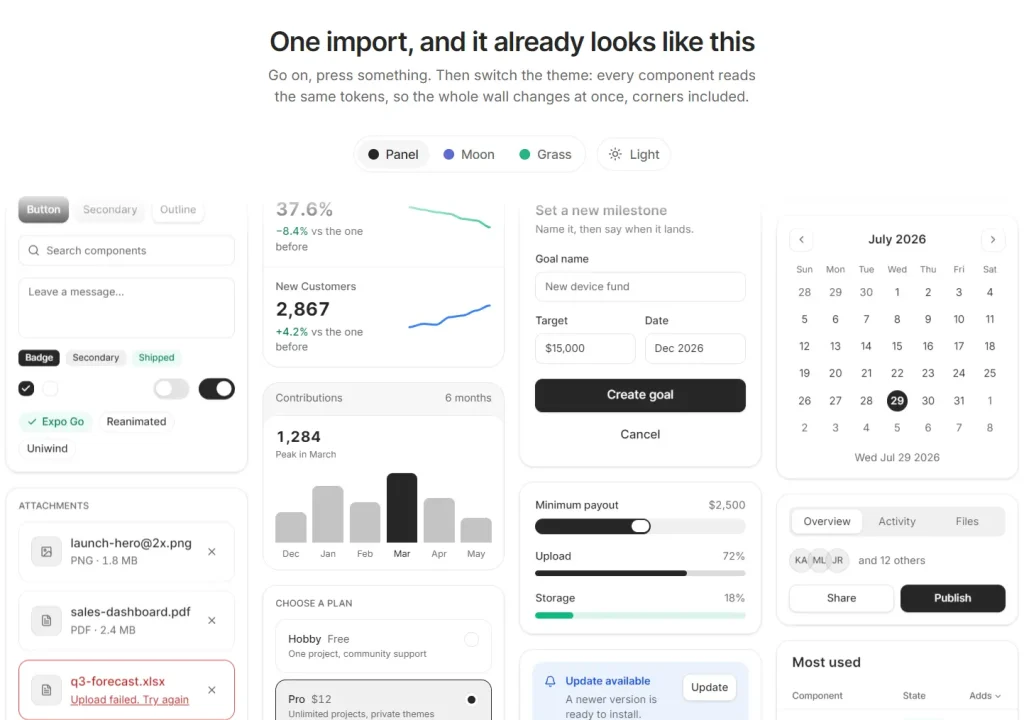
PanelUI is a Tailwind CSS 4 UI component library for Expo apps and React websites.
You can install the components as packages or copy them into your project and edit the source.
Preview
Start a new Expo app
Choose the starter or minimal template, an app name, and an initial theme when prompted. The generator sets up Metro, the CSS entry, and PanelUIProvider.
npx create-panelui-app@latestAdd PanelUI to an existing Expo app
For an existing Expo app, install panelui-native and its core dependencies. Uniwind applies the Tailwind classes, and Reanimated runs the component animations.
npx expo install panelui-native
npx expo install uniwind tailwindcss react-native-reanimated react-native-worklets react-native-gesture-handler react-native-safe-area-context react-native-svg @react-native-masked-view/masked-view expo-linear-gradient
Create or update metro.config.js in the project root. Set cssEntryFile to the stylesheet you will use for PanelUI. This example uses src/global.css.
// metro.config.js
const { getDefaultConfig } = require('expo/metro-config');
const { withUniwindConfig } = require('uniwind/metro');
module.exports = withUniwindConfig(getDefaultConfig(__dirname), {
  cssEntryFile: './src/global.css',
  dtsFile: './uniwind-types.d.ts',
  extraThemes: ['moon', 'moon-dark', 'grass', 'grass-dark'],
});
Add the imports to src/global.css. The @source path below is relative to this stylesheet. If your own classes work but PanelUI components look unstyled, check that scan path.
@import 'tailwindcss';
@import 'uniwind';
@import 'panelui-native/theme.css';
@source '../node_modules/panelui-native/src';
Import the stylesheet once and place one PanelUIProvider above navigation. The provider handles root gestures and the themed page background, and mounts the portal host and toast viewport for overlays. For an Expo Router app with routes in src/app, edit src/app/_layout.tsx.
import '../global.css';
import { Stack } from 'expo-router';
import { PanelUIProvider } from 'panelui-native';
export default function RootLayout() {
  return (
    <PanelUIProvider>
      <Stack />
    </PanelUIProvider>
  );
}
Restart Metro to load the updated configuration.
npx expo start --clearAdd a card to an Expo screen
Import Button and Card through their component subpaths to keep Metro from loading the entire native library.
import { View } from 'react-native';
import { Button } from 'panelui-native/components/button';
import { Card } from 'panelui-native/components/card';
export default function ProjectCard() {
  return (
    <View className="flex-1 justify-center bg-background p-6">
      <Card>
        <Card.Header>
          <Card.Title>Website redesign</Card.Title>
          <Card.Description>Review the next project milestone.</Card.Description>
        </Card.Header>
        <Card.Footer>
          <Button onPress={() => console.log('Open project')}>
            Open project
          </Button>
        </Card.Footer>
      </Card>
    </View>
  );
}
Native components
| Task | Native components |
|---|---|
| Forms and data entry | Input, Select, Combobox, DatePicker, Calendar, Signature |
| Navigation and actions | Button, Tabs, Menu, Breadcrumb, Pagination, Tree |
| Overlays and feedback | Dialog, BottomSheet, Drawer, Popover, Toast, Progress |
| Charts and metrics | LineChart, BarChart, HeatmapChart, Kpi, Plot |
| AI conversations | Message, MessageScroller, Response, Reasoning, Sources, CodeBlock |
| Content and motion | Card, Table, Timeline, Carousel, Marquee, TextAnimation |
Change the native theme
Choose from light, dark, moon, moon-dark, grass, and grass-dark. Each theme family changes the colors and corner radii.
Call useTheme() to select a theme. With useThemeMode(), you can change the theme family and light/dark mode independently.
Copy a native component
npx panelui-cli@latest init
npx panelui-cli@latest add button
Add components to a React website
For a React website, use panelui-web. The web package has different components from panelui-native and requires React 18 or newer, Tailwind CSS 4, and a shadcn-configured project.
You can add Flow to a node-based editor, Lane Board to a task dashboard, or RollingNumber to a metric display. Planet, Day Grid, Sheet, Command Dock, and Tilt Card are also available.
Choose the source-copy route for local edits, or install the package and receive changes through package updates.
Copy the source with shadcn
Check the components alias in components.json before adding Lane Board. The shadcn command writes panelui/lane-board.tsx under that alias and installs @base-ui/react and tailwind-variants.
npx shadcn@latest add https://panelui.dev/r/web/lane-board.jsonInstall the web package
npm install panelui-webKeep the shadcn theme tokens in your existing stylesheet and add a scan path for the package. Adjust the relative path to match the stylesheet’s location.
@import 'tailwindcss';
@source '../node_modules/panelui-web/dist';
Display an animated number
import { RollingNumber } from 'panelui-web/rolling-number';
export function SalesTotal() {
  return <RollingNumber value={298} className="text-6xl font-bold" />;
}