Description:
munim-maps is a React Native map library that presents a shared API for MapKit, Google Maps, Mapbox, MapLibre, and Cesium.
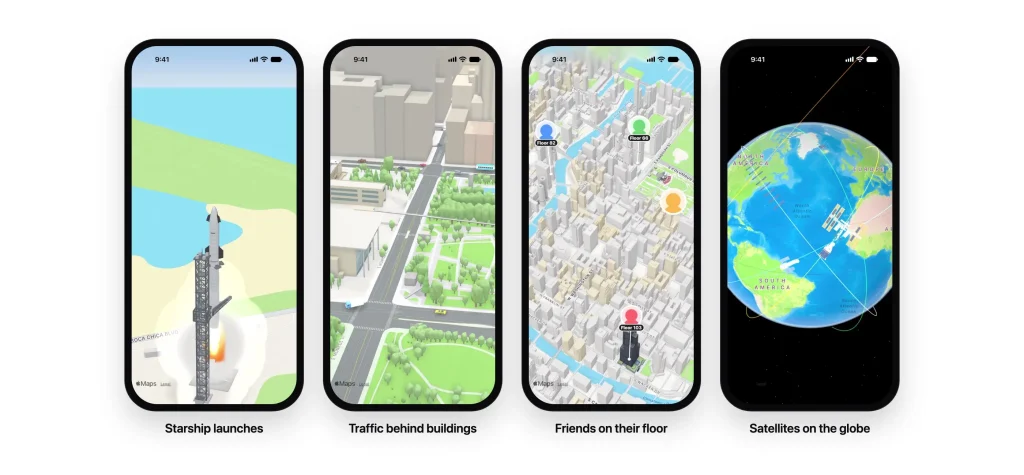
It adds coordinate-anchored 3D models, vehicles, avatars, and zone walls alongside markers, shapes, and camera controls.
Choose an engine per map through provider, or add MapModelLayer over an existing compatible map.
The optional vehicle package supplies model sources that load from a CDN and cache on the device.
Preview
Install and build
npx expo install munim-maps react-native-nitro-modules
npx expo install munim-maps-vehicles
MapKit is built in on iOS. MapLibre is the default Android engine when Google Maps has not been built into the app. For an explicit MapLibre build on both platforms, merge this plugin into app.json:
{
  "expo": {
    "plugins": [
      ["munim-maps", { "providers": ["maplibre"] }]
    ]
  }
}
Rebuild the platform you are developing for. Use npx expo run:android for Android:
npx expo run:iosRender a map and a vehicle
This example uses the MapLibre engine configured above. The vehicle entry carries USDZ and GLB sources; munim-maps chooses the format for the active renderer:
import { MunimMapView, type MapModel } from 'munim-maps';
import { VEHICLES } from 'munim-maps-vehicles';
const models: MapModel[] = [
  {
    id: 'delivery-car',
    coordinate: { latitude: 41.8841, longitude: -87.6244 },
    source: VEHICLES['car-ev'],
    tint: '#E5484D',
    heading: 90,
    screenSize: 24,
  },
];
export default function DeliveryMap() {
  return (
    <MunimMapView
      style={{ flex: 1 }}
      provider="maplibre"
      initialCamera={{
        latitude: 41.8838,
        longitude: -87.6305,
        distance: 2600,
        pitch: 55,
        heading: 20,
      }}
      models={models}
      onModelPress={(id) => console.log('Selected model:', id)}
      onError={(message) => console.warn(message)}
    />
  );
}
Choose a map provider
A providers list controls which Android engines enter the build. Include maplibre explicitly when another provider list would otherwise exclude it.
For MapLibre, renderer: 'auto' uses Native for ordinary maps and GL JS for globe, 3D terrain, or sky.
| Provider | Build and integration considerations |
|---|---|
mapkit | iOS default; no API key |
google | Opt-in native SDKs and a Google Maps key; provider-specific indoor maps and Street View |
mapbox | Opt-in SDKs and a Mapbox token; Standard style, terrain, globe, and offline packs |
maplibre | OpenFreeMap-based default maps need no API key; GL JS handles globe, terrain, and sky requests |
cesium | CesiumJS runs in a WebView; ion-backed assets need an ion token |
Model data and customization
| Field | Purpose |
|---|---|
id | Required stable model identifier and press-callback value |
coordinate | Required latitude and longitude of the model base |
source | Bundled, local, or remote model source |
altitude | Height above the ground in meters |
heading | Degrees clockwise from north |
screenSize | Fixed height in screen points across zoom levels |
tint | Runtime model paint color |
image, badge, stem | Camera-facing avatar, floor badge, and line to the ground |
spinDegreesPerSecond | Continuous rotation |
Import the vehicle collection from munim-maps-vehicles. Older munim-maps/vehicles imports must be replaced. For bundled models, add their file extensions to your existing Metro configuration before returning it:
config.resolver.assetExts.push('usdz', 'glb', 'gltf', 'obj', 'scn');Add 3D to an existing map
On iOS, the overlay attaches to MapKit maps, including the Apple provider in react-native-maps. On Android it has adapters for react-native-maps and @rnmapbox/maps.
The overlay does not attach to Google Maps or Mapbox on iOS. Use MunimMapView for those engines.
Keep the map and layer as siblings, match their identifiers, and install the existing map library with its own platform setup:
import MapView from 'react-native-maps';
import { StyleSheet, View } from 'react-native';
import { MapModelLayer, type MapModel } from 'munim-maps';
export function ModelOverlay({ models }: { models: MapModel[] }) {
  return (
    <View style={{ flex: 1 }}>
      <MapView testID="delivery-map" style={StyleSheet.absoluteFill} pitchEnabled />
      <MapModelLayer mapTestID="delivery-map" models={models} />
    </View>
  );
}


